
Comic-Con 2027
Check your Tech before the sale begins!
See what’s on our tech check roster before the big day. On November 14, our Open Registration badge sale will commence, and many will have the chance to purchase the coveted Comic-Con 2027 badges. Start reading now to learn everything you need to know!

E. Sebastian © 2026
The date to mark for Comic-Con 2027 Open Registration is Saturday, November 14. The waiting room will open at 7:30 AM Pacific Standard Time (PST) with the sale starting shortly after 9:00 AM. Take a quick second right now to look through our tech tips that’ll get you through the sale. For the fine details about the general badge sale, visit our Open Registration page.
PASSWORT-ÜBERPRÜFUNG
Take a moment to confirm your Comic-Con Member ID login before sale day. Every year we receive panicked emails from people who realized too late that their password wasn’t what they remembered. Since you’ll need to log in if randomly selected for a registration session, double-check your access prior to the sale and save yourself the stress!

EMAIL-CHECK
If you purchase badges during Open Registration, an order acknowledgement will be sent to the email linked to each badge holder’s Member ID. Please log in before November 14 and check the email listed under your name in the upper left corner. If it’s outdated, update it in the “My Account Information” section.

PAYMENT Details
To make checkout the quickest part of a registration session, log in to your Comic-Con Member ID account before November 14 and pre-save your credit card information. When selected for Open Registration, you’ll have 15 minutes to finish your badge purchase, so having your card ready for selection ahead of time can save you valuable seconds.
During checkout, you can either use a saved card or take the time to enter a new one. The payment method you select will apply to all badges in your order. Payments are typically processed within 72 hours after the sale’s completion. If you have more than one card saved, be sure to select your preferred one. If someone else purchases your badge, their card will be used for payment.

ERWARTUNGEN IM WARTEZIMMER
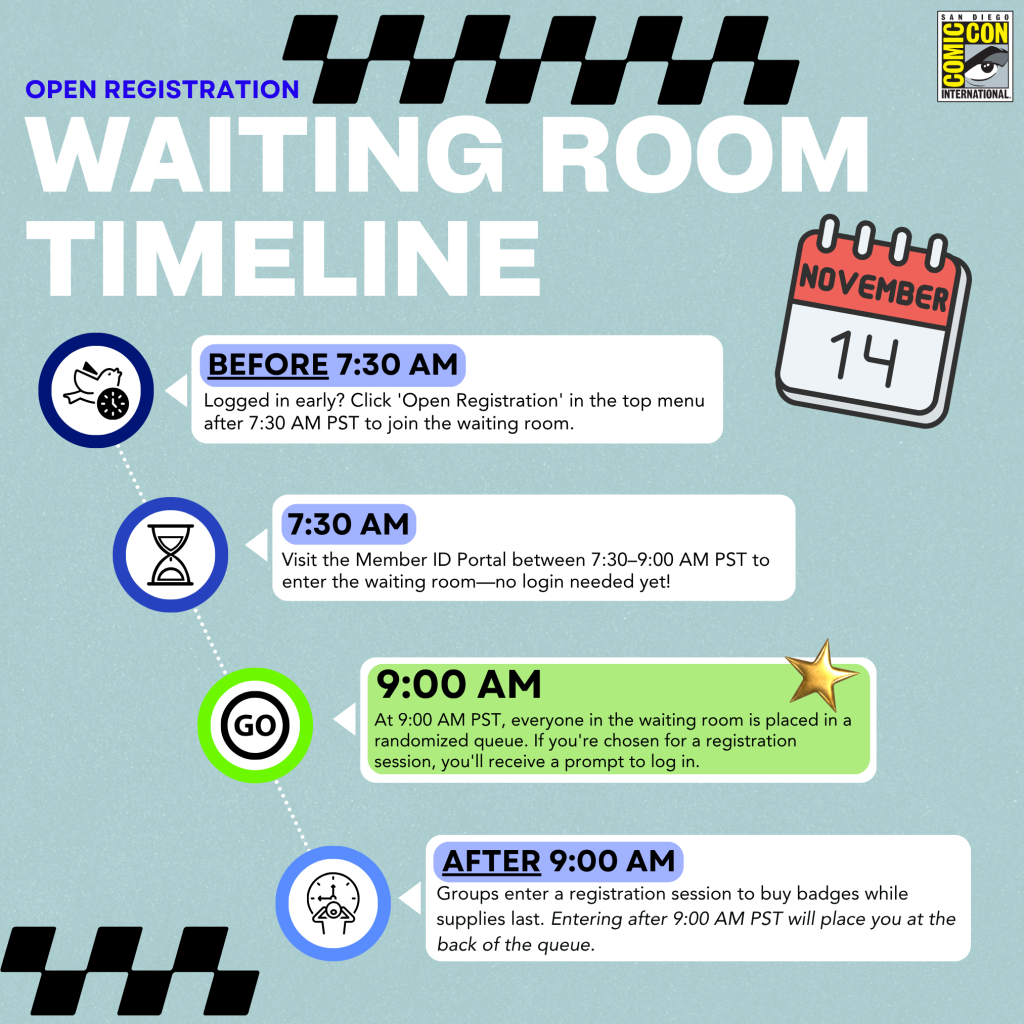
The virtual waiting room for Open Registration opens bright and early at 7:30 AM Pacific Standard Time (PST) on November 14. To join, head to the Member ID Portal anytime between 7:30 AM and 9:00 AM PST — there’s no special link or extra step required. Already logged in? Just select “Open Registration” from the top menu after 7:30 AM PST to enter.
Keep in mind that entering the waiting room doesn’t guarantee a registration session. When badge sales begin at 9:00 AM PST, everyone in the waiting room will be placed into a randomized queue. If your turn comes up, you’ll be prompted to log in to your Member ID to proceed. Only valid Member ID accounts will be able to access the sale.
WARNING: If you arrive AT 9:00 AM PST or later, you’ll be placed at the end of the queue.
STATUSMELDUNGEN
The waiting room’s status messages will keep you informed every step of the way, with tips and updates on badge availability. If you’re chosen for a registration session, you’ll have 15 minutes to complete your purchase, so stay attentive and prepared. For live badge updates, be sure to follow us on Instagram and X too!
BROWSER und GERÄTE
Before November 14, confirm your browser is up to date. The waiting room and registration system have been tested on:
- Firefox (neueste Version)
- Google Chrome (neueste Version)
- Safari (neueste Version)
- Microsoft EDGE (neueste Version)
Bei den meisten modernen Webbrowsern sind Javascript und Cookies standardmäßig aktiviert, aber wir empfehlen, Ihre Einstellungen zu überprüfen, um sicherzugehen. Es ist immer eine gute Idee, sicherheitshalber zu überprüfen, ob sie aktiviert sind.
To avoid technical issues, use only one browser on a single device per person during the badge sale. Using multiple browsers or devices can disrupt your session, and we are not responsible for any resulting problems. Please stick to the certified browsers listed to the left for the best experience.
Der Badge-Verkauf ist nicht für die Verwendung auf Mobiltelefonen, iPads oder Tablets optimiert, und die Comic-Con kann das erwartete Verhalten des Registrierungssystems beim Zugriff über ein mobiles Gerät nicht garantieren. Wir empfehlen dringend, einen Laptop oder Desktop-Computer zu verwenden, um am Badge-Verkauf teilzunehmen.
POWER-SAVING SETTINGS
Stellen Sie sicher, dass Sie die Energieeinstellungen Ihres Computers so anpassen, dass Ihr Bildschirm nicht in den Ruhezustand geht, während Sie im Wartezimmer sind. Wenn Ihr Bildschirm inaktiv wird und Sie entfernt werden, geraten Sie nicht in Panik. Kehren Sie einfach zum Mitglieder-ID-Portal zurück, indem Sie denselben Browser auf demselben Gerät verwenden, und Sie werden wieder an Ihren ursprünglichen Platz in der Warteschlange gesetzt.
CONNECTION RISKS: VPNS AND REFRESHING
Resist the urge to refresh your browser! The Queue-it waiting room is designed to automatically refresh every 30 seconds. Manually refreshing your browser while in the waiting room could lead to technical issues that are out of our control. We also advise against using a VPN or privacy relay. These tools can interfere with your connection and may prevent you from accessing the waiting room successfully.
Fairplay-Erinnerung
Betrügen Sie das System nicht!
If the system detects suspicious activity during your registration session, whether knowingly or unknowingly through shared* waiting room information or URLs, Comic-Con reserves the right to cancel all badges in your order. This also applies if your order was placed by someone whose session is flagged. Any suspicious sessions risk cancellation of all associated badges.
*There is no rule preventing you from using your session URL to move from YOUR laptop to YOUR phone. However, you cannot share your session with another person.
Getting pumped for Comic-Con 2027? Organize your tech checklist and kick off your registration adventure today!
Bleiben Sie auf dem Laufenden über alle spannenden Ankündigungen, indem Sie uns folgen auf Instagram, Facebook, Xund Toucan - der offizielle Blog von Comic-Con und WonderCon.