
Comic-Con 2027
Check your Tech before the sale begins!
See what’s on our tech check roster before the big day. On November 14, our Open Registration badge sale will commence, and many will have the chance to purchase the coveted Comic-Con 2027 badges. Start reading now to learn everything you need to know!

E. Sebastian © 2026
The date to mark for Comic-Con 2027 Open Registration is Saturday, November 14. The waiting room will open at 7:30 AM Pacific Standard Time (PST) with the sale starting shortly after 9:00 AM. Take a quick second right now to look through our tech tips that’ll get you through the sale. For the fine details about the general badge sale, visit our Open Registration page.
SURIIN ANG PASSWORD
Take a moment to confirm your Comic-Con Member ID login before sale day. Every year we receive panicked emails from people who realized too late that their password wasn’t what they remembered. Since you’ll need to log in if randomly selected for a registration session, double-check your access prior to the sale and save yourself the stress!

EMAIL CHECK
If you purchase badges during Open Registration, an order acknowledgement will be sent to the email linked to each badge holder’s Member ID. Please log in before November 14 and check the email listed under your name in the upper left corner. If it’s outdated, update it in the “My Account Information” section.

PAYMENT Details
To make checkout the quickest part of a registration session, log in to your Comic-Con Member ID account before November 14 and pre-save your credit card information. When selected for Open Registration, you’ll have 15 minutes to finish your badge purchase, so having your card ready for selection ahead of time can save you valuable seconds.
During checkout, you can either use a saved card or take the time to enter a new one. The payment method you select will apply to all badges in your order. Payments are typically processed within 72 hours after the sale’s completion. If you have more than one card saved, be sure to select your preferred one. If someone else purchases your badge, their card will be used for payment.

MGA INAASAHAN SA WAITING ROOM
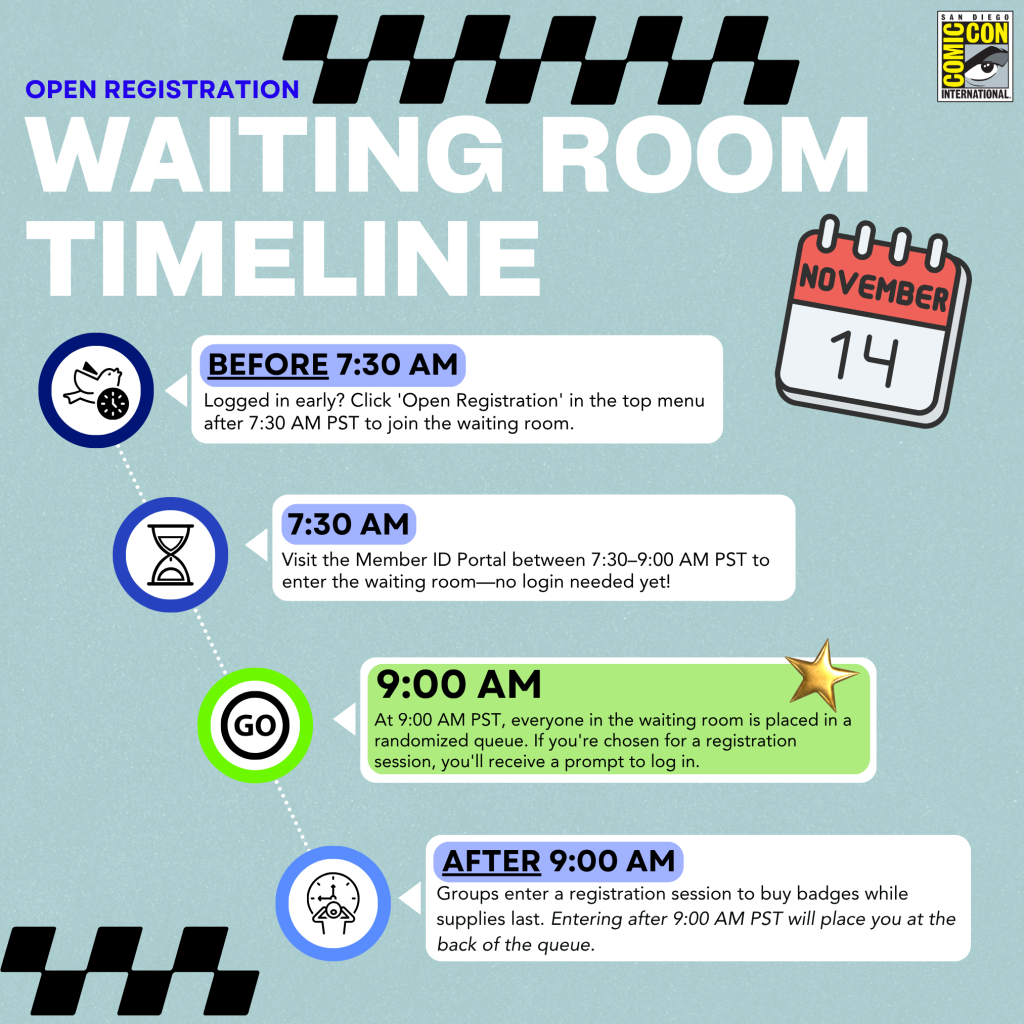
The virtual waiting room for Open Registration opens bright and early at 7:30 AM Pacific Standard Time (PST) on November 14. To join, head to the Member ID Portal anytime between 7:30 AM and 9:00 AM PST — there’s no special link or extra step required. Already logged in? Just select “Open Registration” from the top menu after 7:30 AM PST to enter.
Keep in mind that entering the waiting room doesn’t guarantee a registration session. When badge sales begin at 9:00 AM PST, everyone in the waiting room will be placed into a randomized queue. If your turn comes up, you’ll be prompted to log in to your Member ID to proceed. Only valid Member ID accounts will be able to access the sale.
WARNING: If you arrive AT 9:00 AM PST or later, you’ll be placed at the end of the queue.
MGA MENSAHE NG STATUS
The waiting room’s status messages will keep you informed every step of the way, with tips and updates on badge availability. If you’re chosen for a registration session, you’ll have 15 minutes to complete your purchase, so stay attentive and prepared. For live badge updates, be sure to follow us on Instagram and X too!
MGA BROWSER AT DEVICE
Before November 14, confirm your browser is up to date. The waiting room and registration system have been tested on:
- Firefox (Pinakabagong Bersyon)
- Google Chrome (Pinakabagong Bersyon)
- Safari (Pinakabagong Bersyon)
- Microsoft EDGE (Pinakabagong Bersyon)
Karamihan sa mga modernong web browser ay may mga tampok na Javascript at Cookie na pinagana sa pamamagitan ng default, ngunit inirerekumenda namin ang pag double check sa iyong mga setting upang matiyak. Laging magandang ideya na i verify na sila ay na activate bilang pag iingat.
To avoid technical issues, use only one browser on a single device per person during the badge sale. Using multiple browsers or devices can disrupt your session, and we are not responsible for any resulting problems. Please stick to the certified browsers listed to the left for the best experience.
Ang badge sale ay hindi na optimize para magamit sa mga cell phone, iPad, o tablet, at hindi magagarantiyahan ng Komik-Con ang inaasahang pag-uugali ng sistema ng pagpaparehistro kapag na-access sa pamamagitan ng mobile device. Mariin naming inirerekumenda ang paggamit ng laptop o desktop computer upang makilahok sa mga benta ng badge.
POWER-SAVING SETTINGS
Tiyaking ayusin ang mga setting ng kuryente ng iyong computer upang ihinto ang iyong screen mula sa pagtulog habang ikaw ay nasa waiting room. Kung ang iyong screen ay talagang pumunta idle at ikaw ay tinanggal, huwag mag panic. Bumalik lamang sa Member ID Portal gamit ang parehong browser sa parehong device, at ilalagay ka kaagad sa iyong orihinal na lugar sa pila.
CONNECTION RISKS: VPNS AND REFRESHING
Resist the urge to refresh your browser! The Queue-it waiting room is designed to automatically refresh every 30 seconds. Manually refreshing your browser while in the waiting room could lead to technical issues that are out of our control. We also advise against using a VPN or privacy relay. These tools can interfere with your connection and may prevent you from accessing the waiting room successfully.
Paalala sa Fair Play
Huwag Dayain ang Sistema!
If the system detects suspicious activity during your registration session, whether knowingly or unknowingly through shared* waiting room information or URLs, Comic-Con reserves the right to cancel all badges in your order. This also applies if your order was placed by someone whose session is flagged. Any suspicious sessions risk cancellation of all associated badges.
*There is no rule preventing you from using your session URL to move from YOUR laptop to YOUR phone. However, you cannot share your session with another person.
Getting pumped for Comic-Con 2027? Organize your tech checklist and kick off your registration adventure today!
Manatili sa tuktok ng lahat ng kapana-panabik na mga anunsyo sa pamamagitan ng pagsunod sa amin sa Instagram, Facebook, X, at Toucan – ang opisyal na blog ng Comic-Con at WonderCon.