
Comic-Con 2027
The Ultimate Badge Sale Prep for 2027
The countdown to Comic-Con® 2027 Returning Registration is on! Get ahead of the sale with these tips to help you prepare.

B. Jackson © 2026 SDCC
Comic-Con 2027 Returning Registration is just around the corner on October 17, so now is the time to get prepared. Whether you need a refresher on the waiting room, or want to know what to expect on registration day, our checklist has you covered. Review the tips below, then visit our Returning Registration page for everything you need to know.
密码检查
If you haven’t logged in to your Comic-Con Member ID account in a while, please make sure you can access your account well ahead of the badge sale. If you’re eligible for Returning Registration, you will need to log in if you’re randomly selected for a registration session. Don’t let a forgotten password keep you from purchasing badges!

电子邮件检查
If you purchase badges during Returning Registration, an order acknowledgement email will be sent to the email address linked to your Member ID account. Log in to your Member ID account before October 17 and review the upper left corner under your name. If your email is outdated, you can update it in the “My Account Information” section.

信用卡信息
To make sure that your checkout process is effortless, we recommend you go into your Member ID account before October 17 and save your credit card information under “My Payment Methods” ahead of the sale. If you participate in Returning Registration and are selected for a registration session, you will have 15 minutes total to complete your badge purchase. Having your credit card information pre-saved can help you maximize time.
During checkout, you’ll be able to select a pre-saved payment method or enter a new credit card, and it will be used to purchase all badges included in your order. If someone purchases a badge for you, the buyer’s selected payment method will be used. Payments are typically processed within 72 hours after the sale’s completion. For visual guidance in saving your card information, use the image below:

候诊室期望
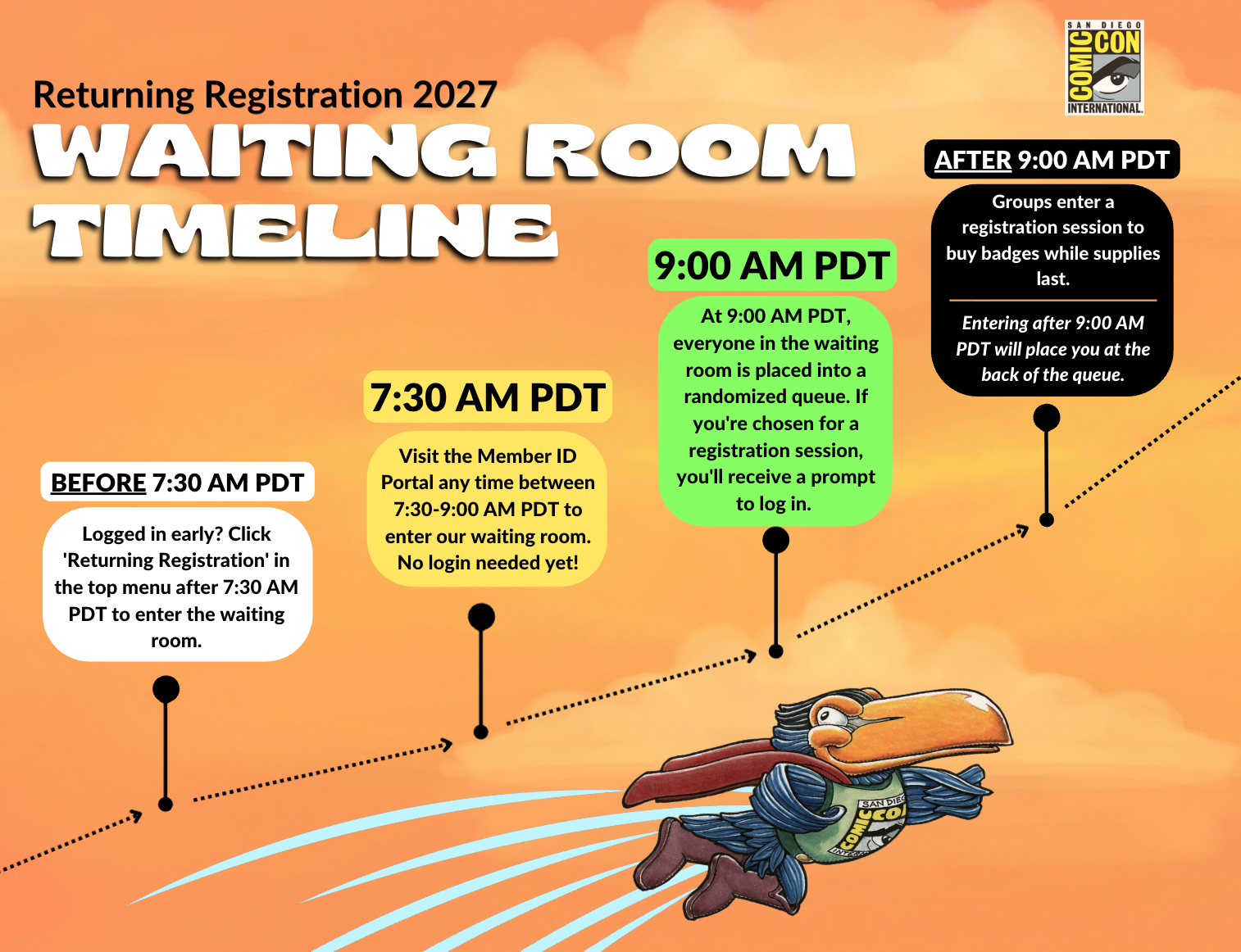
On October 17, the virtual waiting room opens at 7:30 AM Pacific Daylight Time (PDT). To participate in the badge sale, arrive at the Member ID Portal between 7:30 AM and 9:00 AM PDT to enter the waiting room—no additional steps required.
If you’re already logged in before the waiting room opens, click “Returning Registration” in the top menu bar after 7:30 AM PDT. Entry does not guarantee a session, and not all members will be selected.
The badge sale will begin at 9:00 AM PDT. At that time, everyone in the waiting room will be sorted into a randomized queue. If you’re moved into a registration session, you’ll be prompted to log in to your Member ID account. Your Member ID verifies eligibility. If it is not eligible for Returning Registration, you will not be able to access the badge sale.
认证浏览器
The Queue-it waiting room and badge registration system have undergone testing across a range of web browsers. For optimal performance, please ensure that your browser is updated to the latest version before October 17.
Queue-it 候考室和胸卡注册流程已在最新版本的现代浏览器上进行了测试。如果您使用的浏览器未在下面列出,我们无法保证您的结果:
- Firefox: Latest Version
- Google Chrome: Latest Version
- Safari: Latest Version
- Microsoft Edge: Latest Version
请注意,如果您选择使用不在上述列表中的浏览器,我们无法保证相同的性能和可靠性。
电子设备
We highly recommend using a laptop or desktop computer for badge registration. The registration system is not optimized for use on cell phones, iPads, or tablets, and Comic-Con cannot guarantee the expected behavior of the registration system when accessed via a mobile device.
JavaScript 和 Cookie
在大多数当代网络浏览器中,这些功能通常在配置中默认启用。不过,为谨慎起见,我们强烈建议您确认这些功能是否已启用。
省电设置
To ensure your computer remains active during your stay in the waiting room or registration process, please adjust your computer’s settings to prevent the screen from entering sleep mode prematurely. In the event that you are unexpectedly removed from the waiting room due to your computer going idle, don’t worry. Return to the Member ID Portal using the same browser as you were before to be placed back into the same position in the queue.
connection risks: vpns and refreshing
Resist the urge to refresh your browser! The Queue-it waiting room is designed to automatically refresh every 30 seconds. Manually refreshing your browser while in the waiting room could lead to technical issues that are out of our control. We also advise against using a VPN or privacy relay. These tools can interfere with your connection and may prevent you from accessing the waiting room successfully.
公平竞赛提醒
Please do not attempt to cheat the system. Sharing waiting room information or URLs may lead to removal from the registration queue and cancellation of associated transactions. Dishonest practices, whether during registration or resale, can result in cancellation of ALL badges in the order, including yours.
Voluntary Information:
Update Birth Year
虽然不是强制性的,但在 "我的账户信息 "中分享您的出生年份可以帮助我们提升您的动漫体验。作为一个非营利性组织,这些宝贵的意见往往会为我们带来资助、令人兴奋的座谈会嘉宾、新的机会,以及为我们的与会者量身定制的全面改进的活动。
Stay on top of all exciting announcements by following us on Instagram, Facebook, X, and Toucan – the official blog of Comic-Con and WonderCon.