Comic-Con 2026
The Ultimate Tech Check
Your last-minute tech checklist awaits! Learn the small steps that make a big difference when it’s time to join Open Registration on November 15.

B. Jackson © 2025 SDCC
Get ready for Comic-Con® 2026 Open Registration on Saturday, November 15! Before joining the waiting room at 7:30 AM Pacific Standard Time (PST) with badge sales starting shortly after 9:00 AM, take a moment to review these essential tech tips for a seamless experience. For full details about the general badge sale, visit our Open Registration page.
CONTROLLO DELLA PASSWORD
Take a moment to confirm your Comic-Con Member ID login before sale day. Every year, we hear from attendees who realize too late that they’ve forgotten their password. Since you’ll need to log in if randomly selected for a registration session, double-check your access early and save yourself the stress!

PAYMENT INFORMATION
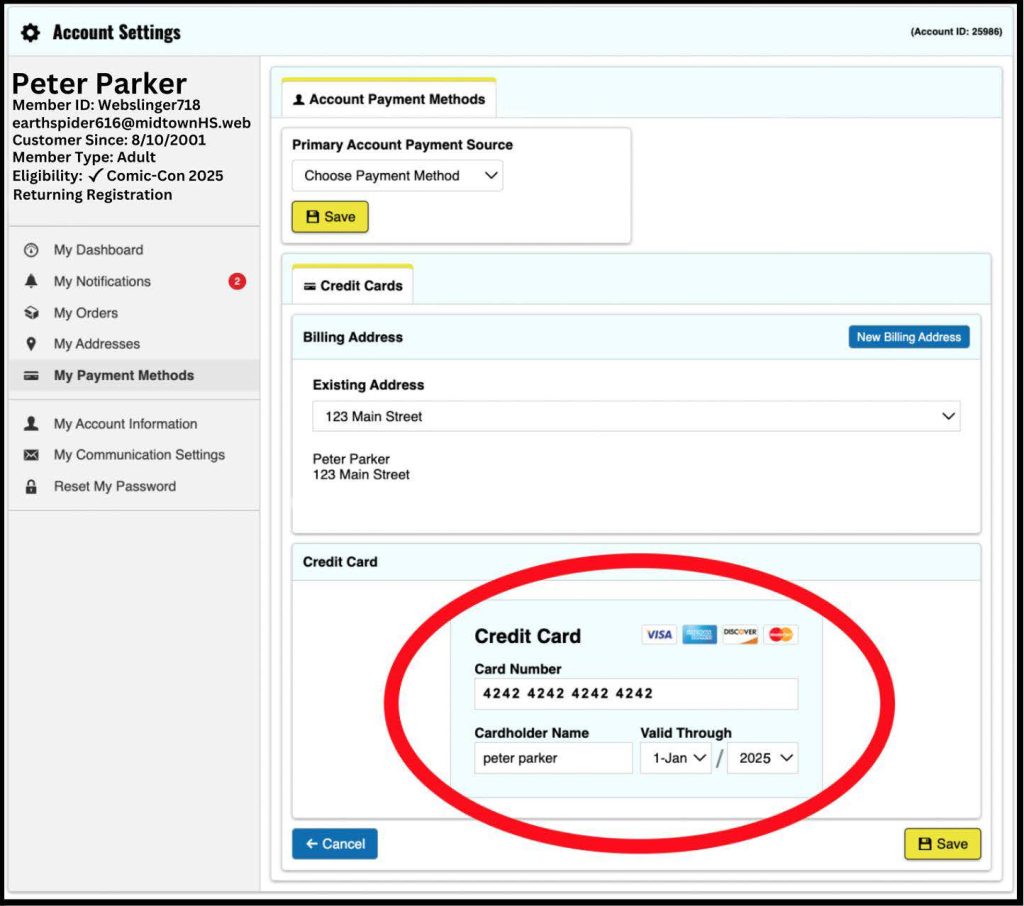
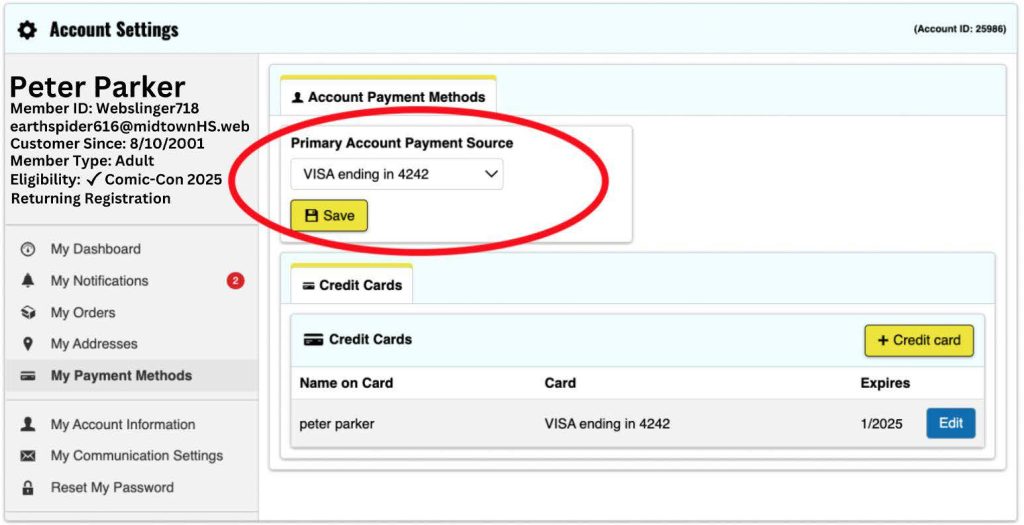
Make checkout quick and easy by logging in to your Comic-Con Member ID account before November 15 to save your credit card information. When selected for Open Registration, you’ll have 15 minutes to finish your badge purchase, so having your card ready ahead of time can save you valuable seconds.
At checkout, you can either use a saved card or enter a new one. The payment method you select will apply to all badges in your order. If you have more than one card saved, be sure to select your preferred one. If someone else purchases your badge, their card will be used for payment.
Seguite i passaggi indicati di seguito per salvare la vostra carta prima della vendita.

CONTROLLO EMAIL
If you purchase badges during Open Registration, an order acknowledgement will be sent to the email linked to each badge holder’s Member ID. Please log in before November 15 and check the email listed under your name in the upper left corner. If it’s outdated, update it in the “My Account Information” section.

ASPETTATIVE DELLA SALA D'ATTESA
The virtual waiting room for Open Registration opens bright and early at 7:30 AM Pacific Standard Time (PST) on November 15. To join, head to the Member ID Portal anytime between 7:30 AM and 9:00 AM PST — there’s no special link or extra step required. Already logged in? Just select “Open Registration” from the top menu after 7:30 AM PST to enter.
Keep in mind that entering the waiting room doesn’t guarantee a registration session. When badge sales begin at 9:00 AM PST, everyone in the waiting room will be placed into a randomized queue. If your turn comes up, you’ll be prompted to log in to your Member ID to proceed. Only valid Member ID accounts will be able to access the sale.
*ATTENZIONE: se arrivate alle 9:00 AM PDT o più tardi, sarete messi alla fine della coda.

MESSAGGI DI STATO
The waiting room’s status messages will keep you informed every step of the way, with tips and updates on badge availability. If you’re chosen for a registration session, you’ll have 15 minutes to complete your purchase, so stay attentive and prepared. For live badge updates, be sure to follow us on Instagram and X too!
BROWSER e DISPOSITIVI
Before November 15, confirm your browser is up to date. The waiting room and registration system have been tested on:
- Firefox (ultima versione)
- Google Chrome (ultima versione)
- Safari (ultima versione)
- Microsoft EDGE (ultima versione)
To avoid technical issues, use only one browser on a single device per person during the badge sale. Using multiple browsers or devices can disrupt your session, and we cannot be responsible for any resulting problems. Please stick to the certified browsers listed to the left for the best experience.
La vendita dei badge non è ottimizzata per l'uso su telefoni cellulari, iPad o tablet e Comic-Con non può garantire il comportamento previsto del sistema di registrazione quando si accede tramite un dispositivo mobile. Si consiglia vivamente di utilizzare un computer portatile o desktop per partecipare alla vendita dei badge.
NON PREMERE IL TASTO DI AGGIORNAMENTO
Resistete all'impulso di aggiornare il browser una volta in sala d'attesa! Il sistema si aggiorna automaticamente ogni 30 secondi per fornire gli aggiornamenti: l'aggiornamento manuale potrebbe causare problemi tecnici al di fuori del nostro controllo.
IMPOSTAZIONI DI RISPARMIO ENERGETICO
Assicuratevi di regolare le impostazioni di alimentazione del computer per evitare che lo schermo si spenga mentre siete in sala d'attesa. Se il vostro schermo si spegne e venite rimossi, non fatevi prendere dal panico. È sufficiente tornare al Portale ID Socio utilizzando lo stesso browser e lo stesso dispositivo per essere ricollocati al proprio posto in coda.
JAVASCRIPT E COOKIE
La maggior parte dei browser web moderni ha abilitato le funzioni Javascript e Cookie per impostazione predefinita, ma si consiglia di ricontrollare le impostazioni per essere sicuri. È sempre una buona idea verificare che siano attivati per precauzione.
Promemoria sul fair play
Non imbrogliate il sistema!
If the system detects suspicious activity during your registration session, whether knowingly or unknowingly through shared* waiting room information or URLs, Comic-Con reserves the right to cancel all badges in your order. This also applies if your order was placed by someone whose session is flagged. Any suspicious sessions risk cancellation of all associated badges.
*There is no rule preventing you from using your session URL to move from YOUR laptop to YOUR phone. However, you cannot share your session with another person.
Getting pumped for Comic-Con 2026? Organize your tech checklist and kick off your registration adventure today!
Rimanete aggiornati su tutti gli annunci più interessanti seguendoci su Instagram, Facebook, Xe Toucan - il blog ufficiale del Comic-Con e del WonderCon.