
Comic-Con 2026
The Ultimate Tech Check
Your last-minute tech checklist awaits! Learn the small steps that make a big difference when it’s time to join Open Registration on November 15.

B. Jackson © 2025 SDCC
Get ready for Comic-Con® 2026 Open Registration on Saturday, November 15! Before joining the waiting room at 7:30 AM Pacific Standard Time (PST) with badge sales starting shortly after 9:00 AM, take a moment to review these essential tech tips for a seamless experience. For full details about the general badge sale, visit our Open Registration page.
パスワードチェック
Take a moment to confirm your Comic-Con Member ID login before sale day. Every year, we hear from attendees who realize too late that they’ve forgotten their password. Since you’ll need to log in if randomly selected for a registration session, double-check your access early and save yourself the stress!

PAYMENT INFORMATION
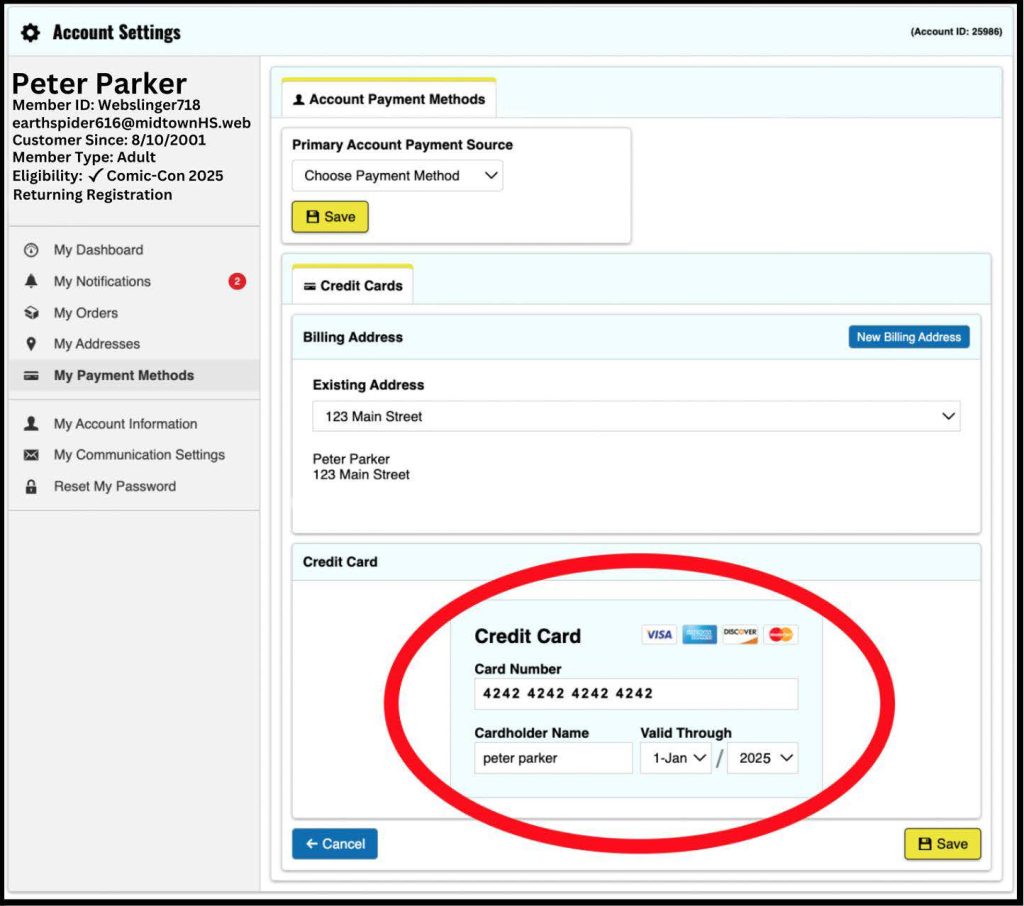
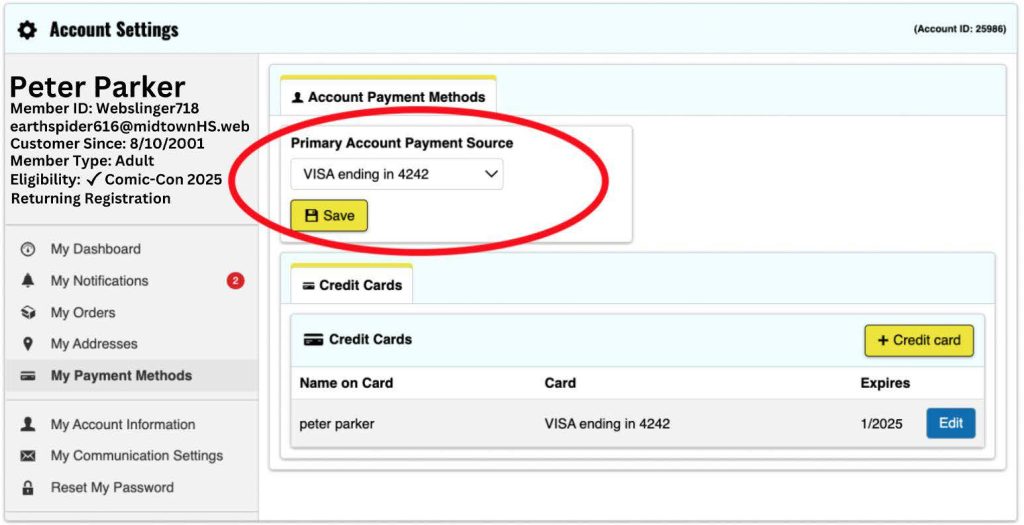
Make checkout quick and easy by logging in to your Comic-Con Member ID account before November 15 to save your credit card information. When selected for Open Registration, you’ll have 15 minutes to finish your badge purchase, so having your card ready ahead of time can save you valuable seconds.
At checkout, you can either use a saved card or enter a new one. The payment method you select will apply to all badges in your order. If you have more than one card saved, be sure to select your preferred one. If someone else purchases your badge, their card will be used for payment.
以下の手順に従って、セール前にカードを保存してください。

Eメールチェック
If you purchase badges during Open Registration, an order acknowledgement will be sent to the email linked to each badge holder’s Member ID. Please log in before November 15 and check the email listed under your name in the upper left corner. If it’s outdated, update it in the “My Account Information” section.

待合室への期待
The virtual waiting room for Open Registration opens bright and early at 7:30 AM Pacific Standard Time (PST) on November 15. To join, head to the Member ID Portal anytime between 7:30 AM and 9:00 AM PST — there’s no special link or extra step required. Already logged in? Just select “Open Registration” from the top menu after 7:30 AM PST to enter.
Keep in mind that entering the waiting room doesn’t guarantee a registration session. When badge sales begin at 9:00 AM PST, everyone in the waiting room will be placed into a randomized queue. If your turn comes up, you’ll be prompted to log in to your Member ID to proceed. Only valid Member ID accounts will be able to access the sale.
*警告:午前9時(PDT)以降に到着した場合、列の最後尾に並びます。

ステータスメッセージ
The waiting room’s status messages will keep you informed every step of the way, with tips and updates on badge availability. If you’re chosen for a registration session, you’ll have 15 minutes to complete your purchase, so stay attentive and prepared. For live badge updates, be sure to follow us on Instagram and X too!
ブラウザとデバイス
Before November 15, confirm your browser is up to date. The waiting room and registration system have been tested on:
- ファイアフォックス(最新版)
- グーグル・クローム(最新版)
- サファリ(最新版)
- マイクロソフトEDGE(最新版)
To avoid technical issues, use only one browser on a single device per person during the badge sale. Using multiple browsers or devices can disrupt your session, and we cannot be responsible for any resulting problems. Please stick to the certified browsers listed to the left for the best experience.
バッジ販売は、携帯電話、iPad、タブレットでの使用に最適化されておらず、Comic-Conはモバイルデバイスからアクセスした場合の登録システムの期待される動作を保証することはできません。バッジ販売に参加される場合は、ノートパソコンまたはデスクトップパソコンを使用されることを強くお勧めいたします。
更新を押さない
待合室に入ったら、ブラウザを更新したくなる衝動を抑えてください!手動で更新すると、技術的な問題が発生する可能性があります。
省電力設定
待合室にいる間、画面がスリープ状態にならないよう、コンピューターの電源設定を調整しておいてください。画面がスリープ状態になり、退出させられても慌てないでください。同じデバイスで同じブラウザを使用して会員IDポータルに戻るだけで、キュー内の元の場所にすぐに戻されます。
ジャバスクリプトとクッキー
最新のウェブブラウザの多くは、JavascriptとCookieの機能がデフォルトで有効になっていますが、念のため設定を再確認することをお勧めします。念のため、常に有効になっていることを確認することをお勧めします。
フェアプレー・リマインダー
システムをごまかすな
If the system detects suspicious activity during your registration session, whether knowingly or unknowingly through shared* waiting room information or URLs, Comic-Con reserves the right to cancel all badges in your order. This also applies if your order was placed by someone whose session is flagged. Any suspicious sessions risk cancellation of all associated badges.
*There is no rule preventing you from using your session URL to move from YOUR laptop to YOUR phone. However, you cannot share your session with another person.
Getting pumped for Comic-Con 2026? Organize your tech checklist and kick off your registration adventure today!
エキサイティングな発表の最新情報は、以下をご覧ください。 インスタグラム, フェイスブック, Xそして Toucan - コミコンとワンダーコンの公式ブログ.