
Comic-Con 2027 Attendee Badge Sale
オープン登録
Here is everything you need to know about participating in our Open Registration badge sale for Comic-Con 2027. For badge pricing and other event-specific information, visit Badges.
このガイドでは
概要
必要なもの
- コミコン会員IDアカウントへのアクセス
- クレジットカード/デビットカードをご用意ください。
- 他の方のために購入される場合は、お友達の会員ID、苗字、購入希望日が必要です。
- Saturday, November 14!
- Queue-itウェイティングルームは午前7時30分(太平洋標準時)にオープンします。
- 販売開始は9:00 AM PSTです!9:00(PST)までに控室にお入りください。
対象者
- 有効なコミコン会員IDアカウントをお持ちの方。
- 他の方の分も購入される場合は、それぞれの方にメンバーIDアカウントが必要です。
- You can purchase for three eligible members total, including or excluding yourself.
どこでそれが起こるか
- The Member ID Portal. This is where a virtual waiting room will be enabled.
- You must be randomly selected for a registration session in order to purchase badges.
- 販売前にアカウントにアクセスできることをご確認ください!バッジを購入する機会があれば、アカウントにログインするよう促され、購入時間が始まります。
参加資格
Comic-Con 2027 Open Registration is open to the general public! Anyone with a valid and confirmed Member ID can participate.
- 公開登録に参加するには、事前にメンバーIDアカウントにログインできることを確認してください。メンバーIDをお持ちでない方は、本日メンバーIDを作成してください!
バッジの購入を希望される方も、同じ資格条件を満たしている必要があります。
すべての参加者がオープン登録時にバッジを購入できるわけではありません。バッジの数よりも参加可能な人数の方が多いためです。以下の説明をよくお読みになり、個人情報をご用意ください。
売却の準備
To purchase badges during Open Registration, you must be randomly selected for a registration session. Participating in the badge sale does not guarantee selection. The information below will help you prepare if you are moved to a registration session during the sale.
1. Verify you have access to your account
Open Registration takes place on Saturday, November 14, 2026! Please make sure you can access your Member ID account before the day of the sale. You’ll need to log in if you get the opportunity to purchase badges. All registration events take place in our Member ID Portal.
2. Have attendee information ready
You can purchase badges for up to three eligible members, including or excluding yourself, during the entire sale. You will need the Member IDs, last names, and the desired days for yourself and anyone else you are purchasing badges for. For example, if only Thursday and Sunday are available by the time you are randomly selected for a purchasing window, does everyone want those days?
3. Plan your payment method
During a registration session, you will be prompted to enter one form of payment for your entire badge order. You can log in to your Member ID account and save your credit card information under “My Payment Methods” ahead of the sale. If you’re selected for a registration session, having your credit card information pre-saved for selection helps maximize your 15-minute time limit. See Payment Methods for additional information.
バッジの購入方法
1. Join the virtual Waiting Room
The Queue-it waiting room will open at 7:30 AM Pacific Standard Time (PST) on the day of the badge sale. To enter the waiting room, simply visit the Member ID Portal between 7:30 AM and 9:00 AM PST on Saturday, November 14, 2026.
待合室は会員IDポータルへのアクセス管理に役立つため、ログイン前に待合室に通される場合があります。セール当日までにご自身のアカウントにアクセスできるようにしておいてください。バッジを購入する機会があれば、ログインする必要があります。
- ウェイティング・ルームがオープンする前に、すでにメンバーIDアカウントにログインしている場合は、ウェイティング・ルームが午前7時30分(太平洋標準時)にオープンしたら、上部メニューバーから「Open Registration」をクリックしてください。
You do not need to rush to the waiting room at 7:30 AM PST! Eligible attendees will have over an hour to enter the waiting room. Early arrival to the waiting room does not provide any advantage over those who arrive later than you. However, you must enter the waiting room before 9:00 AM PST. If you enter the waiting room after 9:00 AM PST, you will be placed at the back of the line.
2. Wait in the queue
When the badge sale begins, everyone who entered the waiting room between 7:30 AM and 9:00 AM PST will be placed into a randomized queue. Shortly after 9:00 AM PST, groups will automatically begin moving from the waiting room to registration sessions in the order of the randomized queue. Only those selected for a registration session will have the opportunity to purchase badges.
Keep an eye on your place in line! Your wait time may fluctuate based on how quickly people ahead of you are able to complete their registration session.

午前7時30分(太平洋標準時)から午前9時(太平洋標準時)の間の何時に控え室に入ったかは関係なく、控え室に入ったからといって登録セッションに参加できるわけではありません。すべての会員が登録セッションに選ばれるわけではありません。
Do not refresh while you are in the Queue-it waiting room! The Queue-it waiting room will automatically refresh every 30 seconds. Refreshing your browser in the waiting room may cause technical difficulties or remove you from the waiting room.
3. Join a registration session
オープン・レジストレーションでバッジを購入するには、ランダムに選ばれたレジストレーション・セッションに参加する必要があります。ウェイティングルームからバッジ購入のために移動された場合、15分間の登録セッションの残り時間を把握できるよう、ページの上部にタイマーが表示されます。
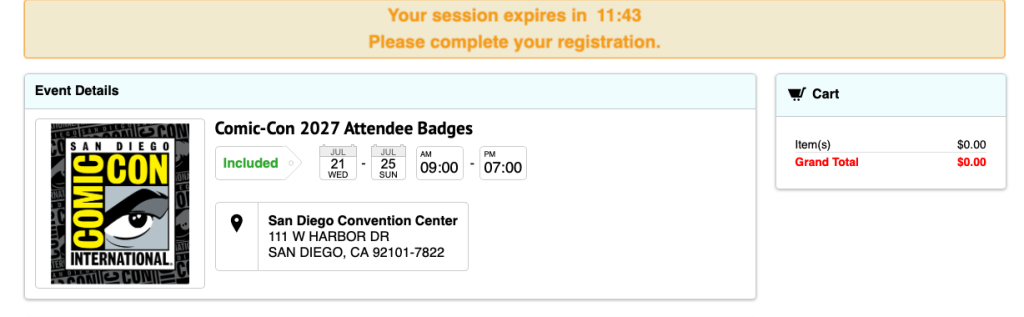
15分以内に、最大3名分のバッジを購入してください。以下のものをご用意ください:
- 会員IDのログイン情報
- 対象となるすべての会員IDと、バッジの購入を希望される方の姓 (姓に特殊文字や接尾辞が含まれる場合は、必ず含めること)
- あなたとあなたのグループが興味のある日
- クレジットカードまたはデビットカード情報
バッジの譲渡はできません。自分のメンバーIDで購入したバッジを、販売後に別のアカウントに譲渡することはできません。
15分以内にすべての登録セッションと購入手続きをお済ませください!この情報の入力が遅れますと、セッションが失効してしまう可能性があります。セッションの有効期限が切れた場合、最後尾の待合室に戻されます。
4. Add badges to your cart
登録セッションに移られた場合、在庫の中からご希望のバッジを選択し、カートに追加します。チェックアウトに進む前に、購入するメンバー全員分のバッジを追加してください。
視覚的なウォークスルーのために以下の手順を展開します!
4a.最初にバッジを追加する
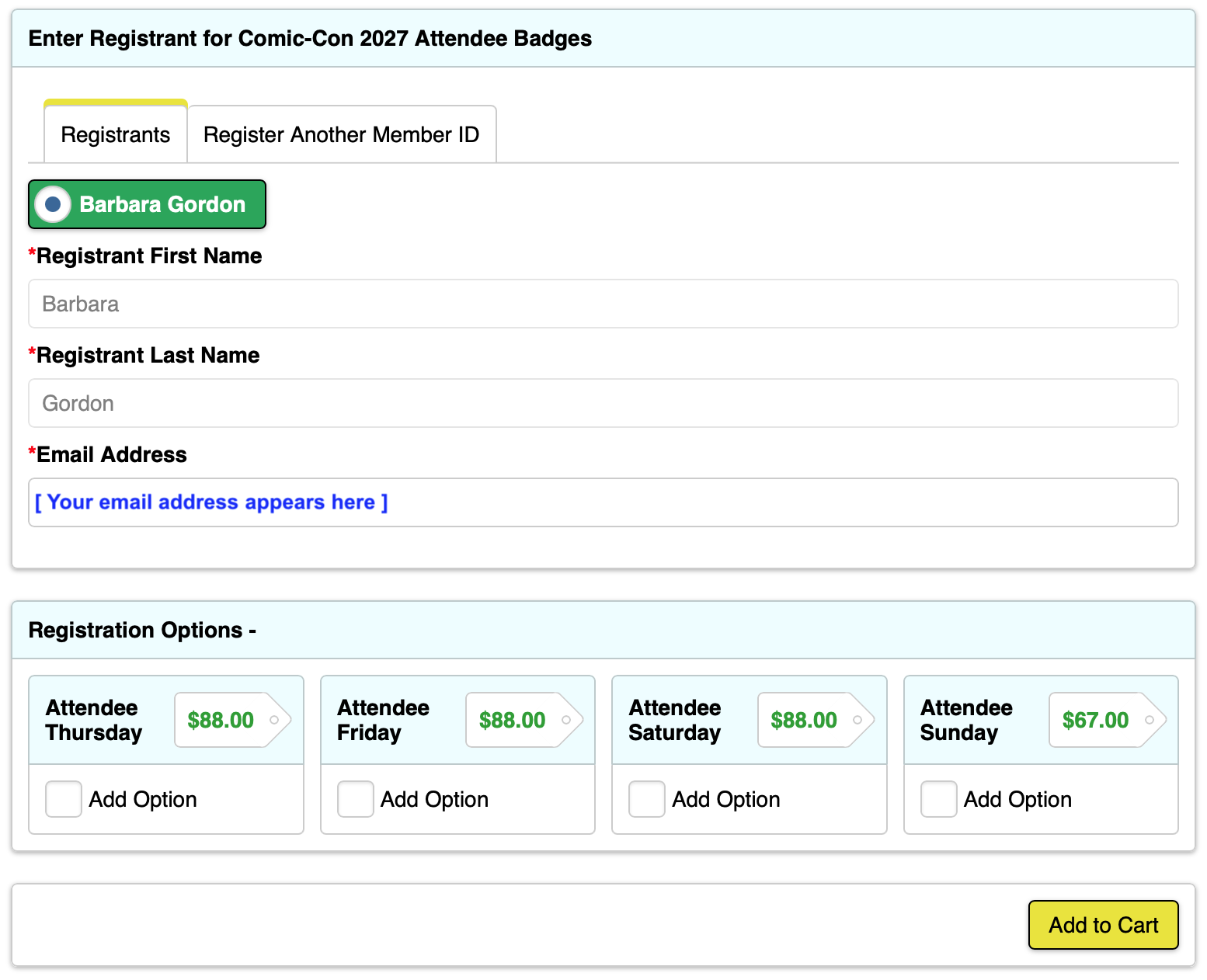
まず、ご自身のバッジをカートに入れることをお勧めします。登録者 "タブにあなたの情報があらかじめ入力されています。参加希望日のチェックボックスにチェックを入れ、"カートに入れる "をクリックしてください。
自分用にバッジを購入しない場合は、ステップ4cに進んでください。
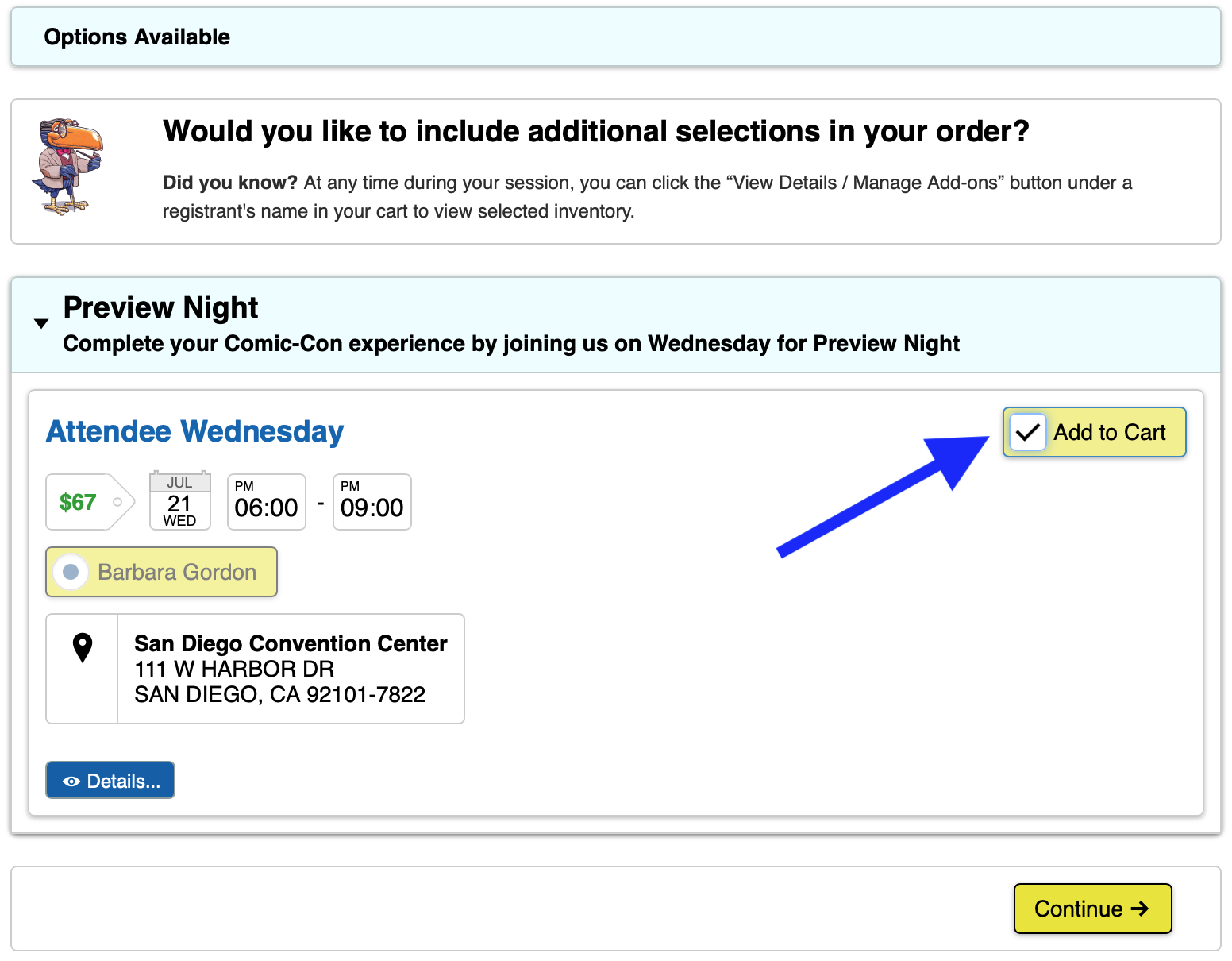
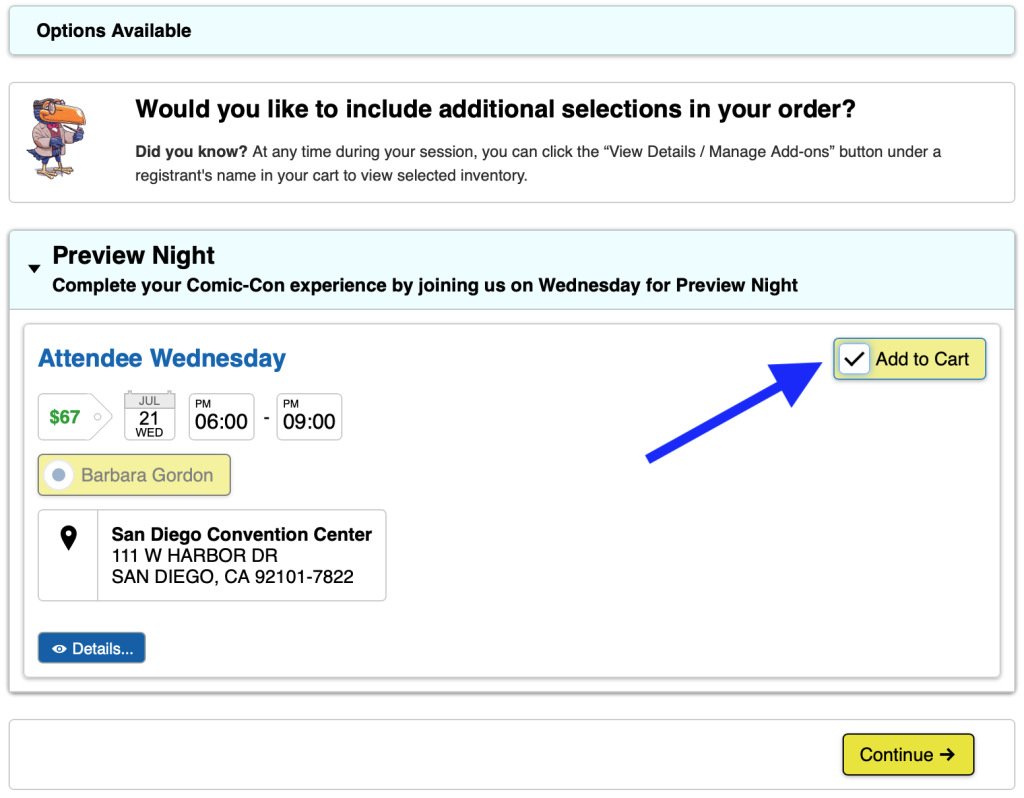
If you add all four daily badges (Thursday, Friday, Saturday, and Sunday) to your cart, you will be given the option to purchase Preview Night if inventory is available. Check the “Add to Cart” box if you’d like to attend Preview Night on Wednesday, July 21, 2027, then click “Continue.”
4b.他の人のバッジを選択するか、チェックアウトに進みます。
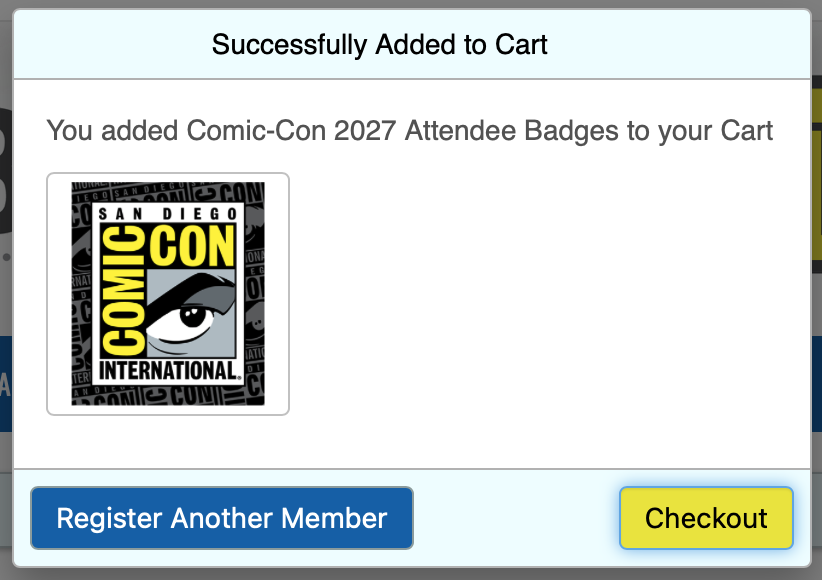
バッジをカートに入れた後、ポップアップウィンドウが表示されます。ここから2つのオプションがあります:
To purchase badges for other eligible members, click “Register Another Member.” You will need their Member ID and last name exactly as it appears on their Member ID account.
If you’re not purchasing badges for others, click “Checkout.” Once you click “Checkout” you will not be able to add or change the registrants in your cart. You will only be able to remove a registrant.
4c.お友達のバッジを選ぶ
To purchase badges for others, you must locate their Member ID account. Select the “Register Another Member ID” tab, enter the Member ID and last name of the member you wish to purchase badges for, and click “Search.”
The Member ID and last name must match exactly what’s on the member’s account. If the Member ID and last name are valid, their name will appear in a green box. If they have a special character in their last name or use a suffix, you must include it.
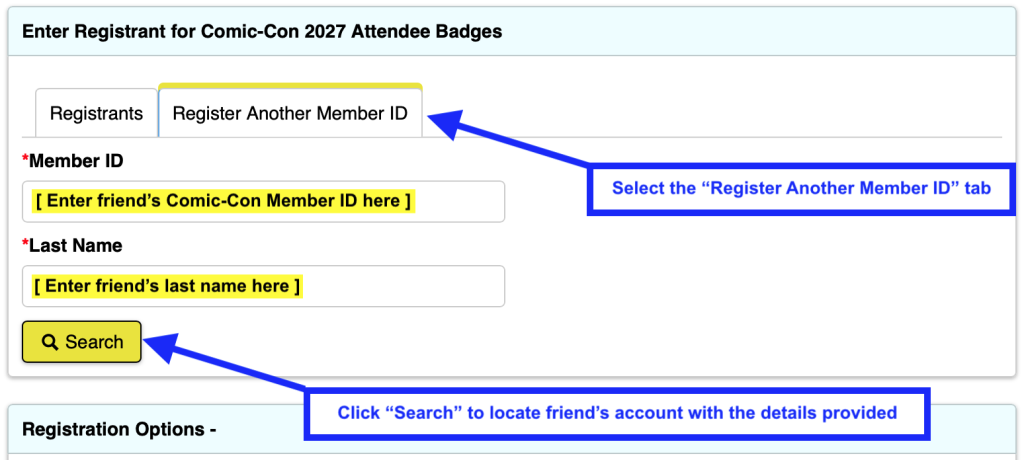
ご友人の参加希望日にチェックを入れ、"カートに入れる "をクリックしてください。
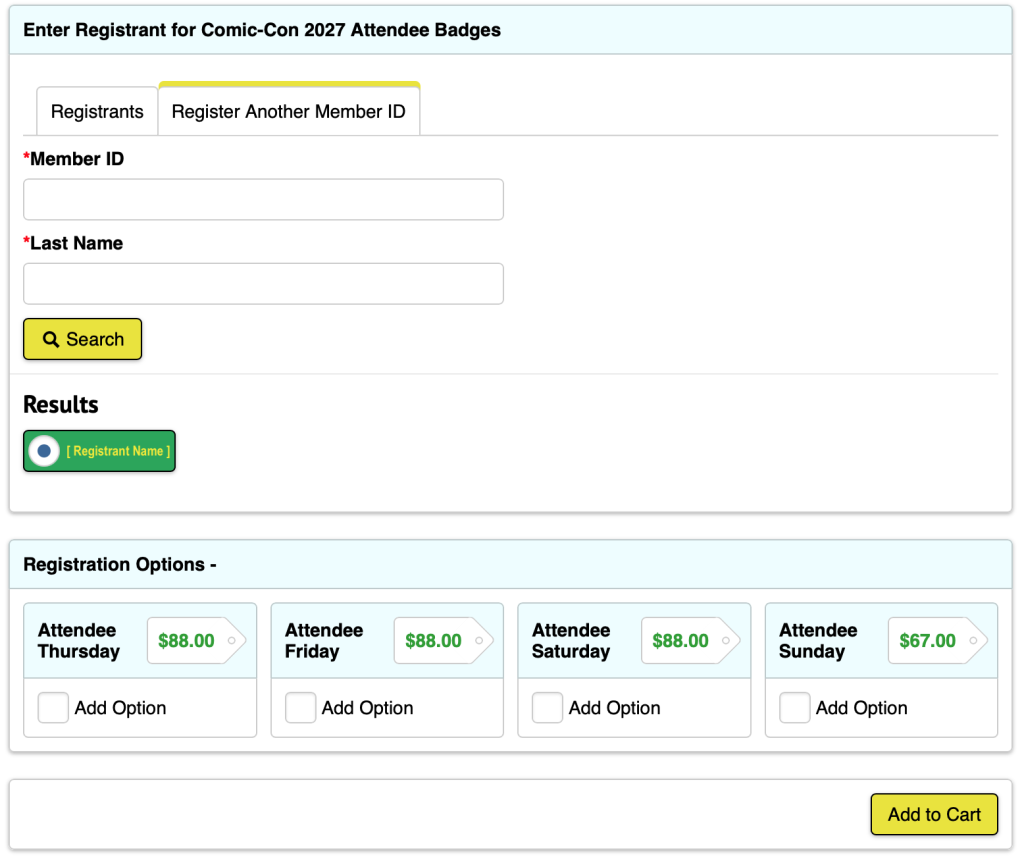
If you add all four daily badges (Thursday, Friday, Saturday, and Sunday) for your friend to your cart, you will be given the option to purchase Preview Night if inventory is available. Check the “Add to Cart” box if your friend would like to attend Preview Night on Wednesday, July 21, 2027, then click “Continue.”
Repeat steps 4b-4c as needed. If you’re purchasing a badge for yourself, you can purchase badges for two other eligible members. If you do not wish to purchase a badge for yourself, you can purchase for three other eligible members.
カートにバッジを入れ終わったら、"チェックアウト "をクリックしてください。
5. Enter payment information
Enter your credit card information and billing address, then click “Save.” If you already have a credit card saved to your account, confirm that the desired payment method is selected, then click “Save & Continue.”
お支払いは販売が完了するまで処理されません。そのため、購入金額の合計が "Due Later "と表示されます。お支払いは72時間以内に処理されます。詳しくはお支払い方法をご覧ください。

6. Place order
The time has come! If you have a few minutes to spare, review the badges in your cart. Each registrant will have the item “Comic-Con 2027 Attendee Badges” with their individual day selections nested beneath it. If everything looks good, click “Process Order.”
If prompted, complete the CAPTCHA that appears above the “Process Order” button. Once your order is submitted, an order acknowledgement will be sent to each registrant’s email.
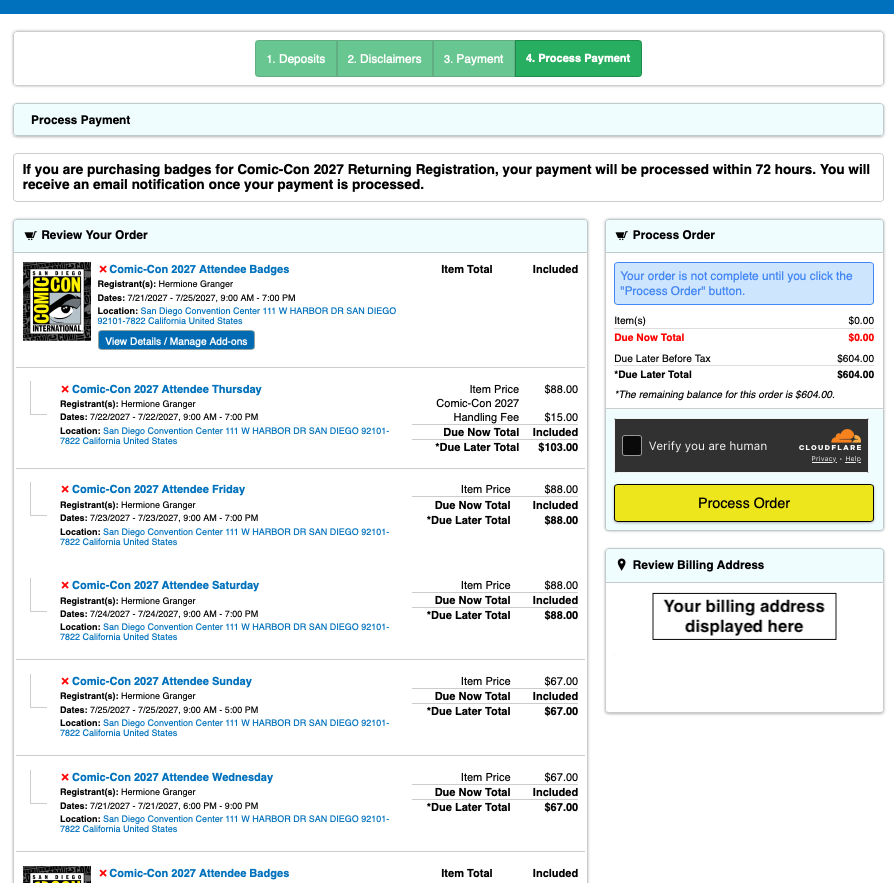
If you get an error message when you attempt to process your order, check to make sure your daily badge selections are accurate.
- You will not be able to check out with Wednesday in your cart unless you have purchased, or are purchasing, all four daily badge options (Thursday-Sunday).
- If you only have “Comic-Con 2027 Attendee Badges” in your cart as a standalone item, you will not be able to check out until you select which days you’d like to purchase.
- If you receive an error message that a badge is no longer available, it must be removed from your cart before you can process your order.
控室に関するFAQ
午前7時30分(太平洋標準時)の開場と同時に控え室に入れば、私は列の最前列に並べるのですか?
No, early arrival to the waiting room does not provide any advantage. You do not need to rush to the waiting room at 7:30 AM PST. Just make sure to enter the waiting room before 9:00 AM PST! Everyone who entered the waiting room between 7:30 AM and 9:00 AM PST on Saturday, November 14, will be placed into a randomized queue when the badge sale begins.
午前9時以降に待合室に入った場合はどうなりますか?
午前9時(太平洋標準時)以降に初めて待合室にお入りいただいた場合、列の最後尾にお並びいただきます。時間通りに待合室に入る参加者が多いため、登録セッションに選ばれる可能性はほとんどありません。午前7時30分(太平洋標準時)から午前9時(太平洋標準時)までに到着した全員が、あなたの前に並びます。
待合室で切断された場合はどうすればいいですか?
Queue-itウェイティングルームから切断された場合は、メンバーIDポータルに戻るだけです。指定されたランダムな場所に戻されます!
バッジ販売開始前の7:30 AM PSTから9:00 AM PSTの間、控え室はどのようになっていますか?
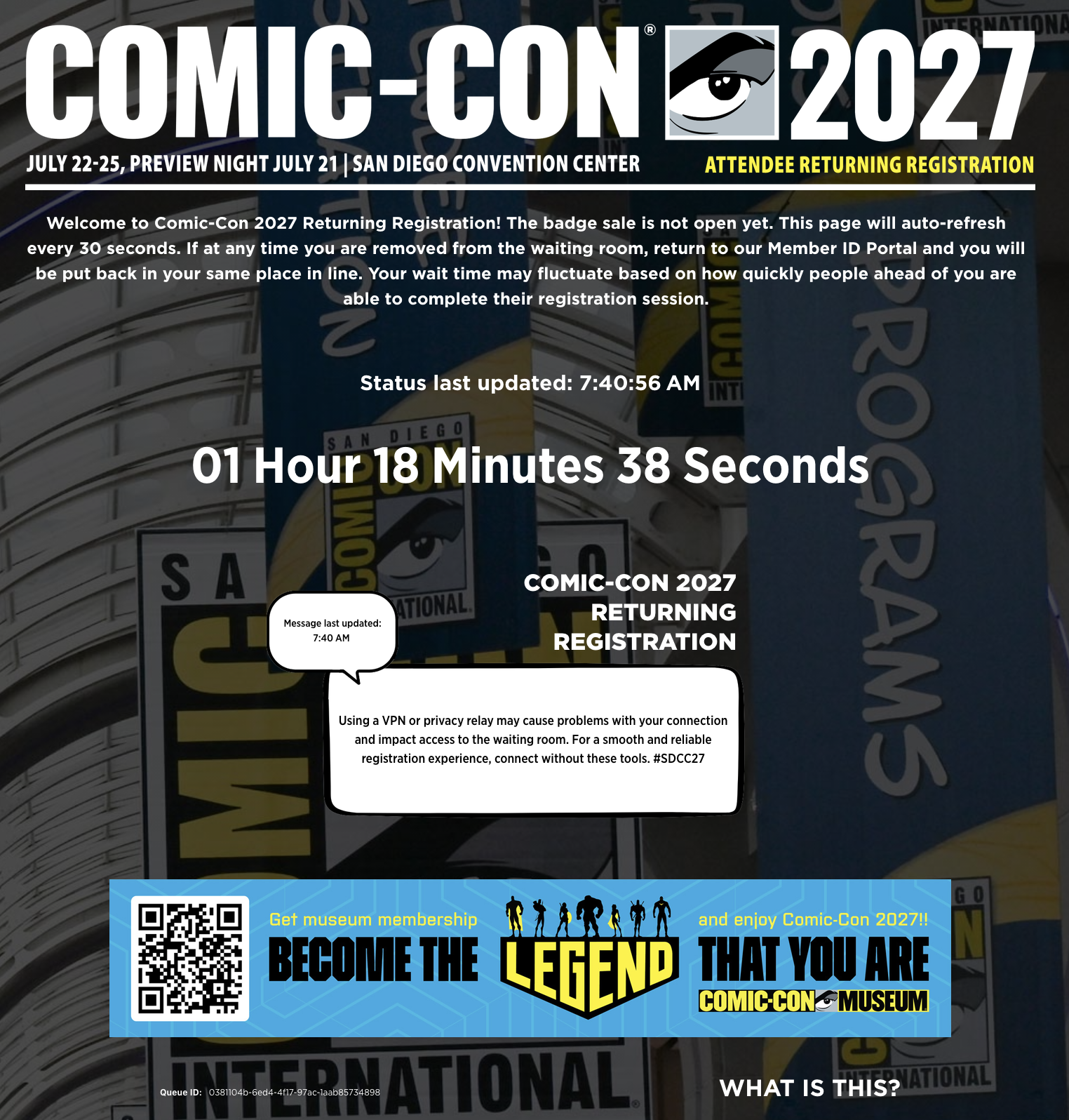
When you enter the waiting room before the badge sale begins, you will see a countdown showing the time remaining until the badge sale begins. The waiting room will have a white status message box that is updated regularly with helpful tips!
午前7時30分(太平洋標準時)にバッジ販売が始まると、控え室はどのようになりますか?
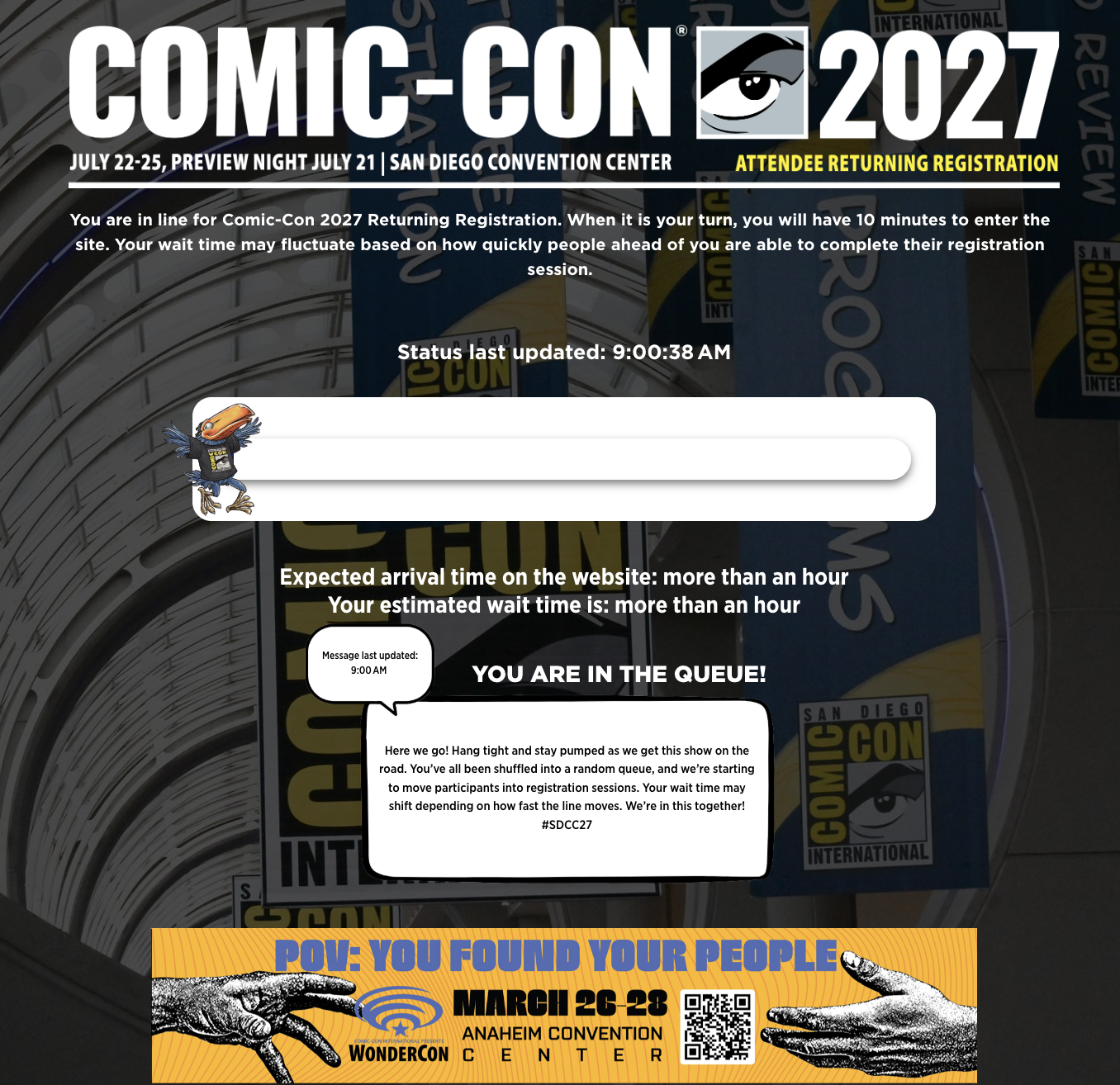
Once the badge sale begins, those in the waiting room will be placed into the queue. You will be able to see your expected wait time and see your walking Toucan begin their journey! Your wait time may fluctuate based on how quickly people ahead of you are able to complete their registration session. Keep an eye on the white status message box for updates on badge inventory.
登録セッションFAQ
How many people can I purchase badges for?
You can purchase for three* eligible members total, including or excluding yourself. If you’re purchasing badges for yourself, you can purchase badges for two other eligible members. If you’re not purchasing badges for yourself, you can purchase badges for three other eligible members.
*This limit applies for each sale. If you purchased for three members during Returning Registration, you are allowed to purchase for another three members during Open Registration if selected for a registration session. You may not purchase badges for more than three members in any sale.
登録セッションの有効期限が切れた場合はどうなりますか?
When a registration session expires without completing a purchase, you’re placed back into the waiting room at the back of the line.
登録セッションに選ばれたにもかかわらず、「ページが見つかりません」というメッセージが表示された場合はどうすればよいですか?
登録セッションに当選し、「ページが見つかりません」というメッセージが表示された場合は、上部メニューバーから「登録を開く」または「ログイン」をクリックしてください。いずれかの方法でメンバーIDアカウントにログインし、決められた時間内にバッジを購入してください。
カートに入れた後、バッジの選択を編集することはできますか?
Yes! Once badges have been added to your cart, the steps to follow depend on whether you want to add or remove badges.
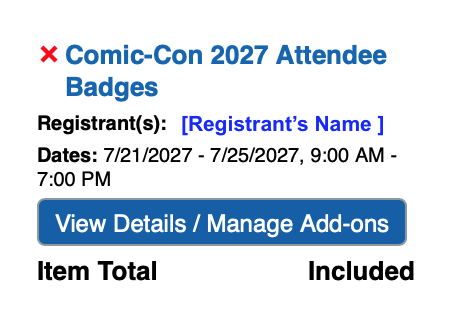
To remove a badge for a registrant, click the red X next that item in your cart.
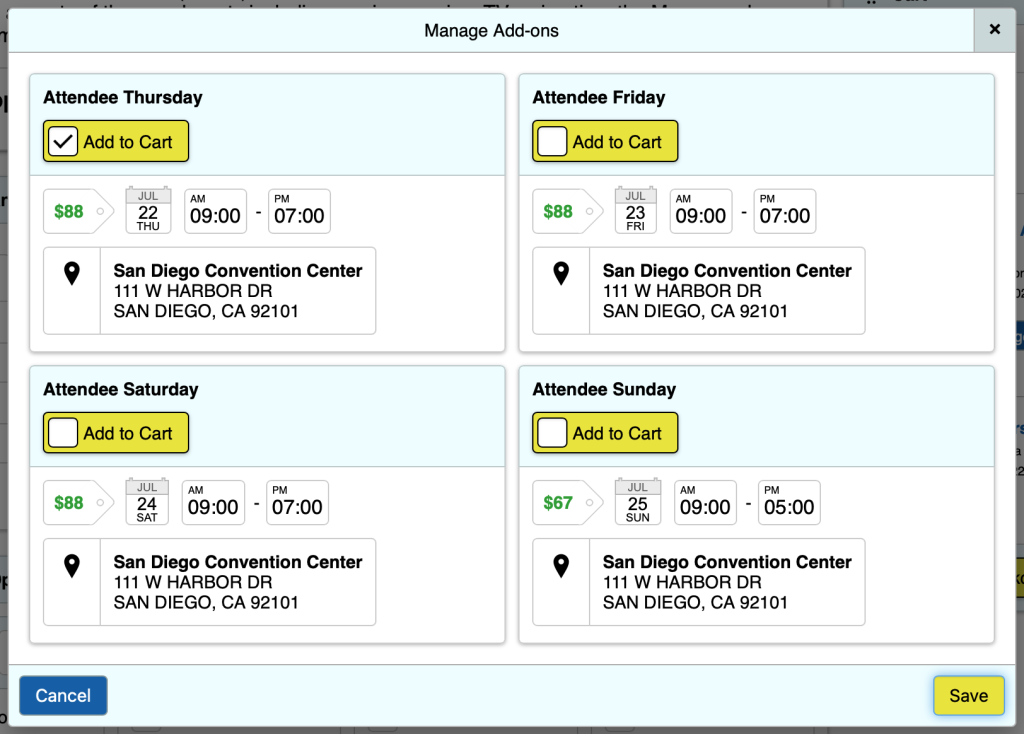
To select additional badges for a registrant, click the “View Details / Manage Add-ons” button next to the registrant’s name. In the “Manage Add-ons” pop-up window, check the box next to the available badge options that remain and click “Save.”
編集できるのはバッジの選択のみで、登録ページを過ぎると登録者の追加や変更はできません。
追加情報
バッジ在庫
バッジはすぐに売り切れることがあります。登録セッションに選ばれた場合、その時点で入手可能な在庫が提示されます。バッジは日替わりオプションとしてのみ提供されます。カートに追加されたバッジが、ご注文手続きまでにご用意できない可能性もございます。
If you receive an error message that a badge is no longer available, please click the red X next to that item to remove it from your cart, then click “Process Order” to purchase the remaining available badges.
プレビュー・ナイトと4日間バッジ
プレビューナイトバッジオプションは、木曜、金曜、土曜、日曜のバッジを購入した場合のみ購入可能です。プレビューナイトは単独のオプションではありません。例年通り、4つのデイリーバッジ(木曜日から日曜日)を全て購入された場合、自動的に4-Dayバッジに変更されます。コンソリデーションを選択することはできません。
チャイルド・バッジ
大人と同伴の子供(12歳以下)は無料。 ここをクリックをクリックしてください。
バッジの確認
バッジの確認は、払い戻し期限が過ぎ次第、後日お送りいたします。
Payments
Comic-Con accepts Visa, MasterCard, Discover, and American Express only. We do not accept PayPal or other online payment systems.
Only one form of payment can be submitted with your order. Payments will not be processed until after the sale is complete. Because of this, you will see the total amount of your purchase marked as “Due Later.” Payments will be processed within 72 hours, and the account holder that placed the order (“buyer”) will be notified of the payment status once processing is complete.
Declined Payments: If the order’s payment is declined, only the buyer will receive an email notification with an opportunity to submit a different method of payment.
- The original method of payment will attempt to be charged every day for 30 days until the payment is processed successfully, or a different method of payment is provided.
- If the buyer doesn’t submit a different method of payment that can be processed successfully, the badge holder can log in to their own account to pay for their badge directly.
- If an outstanding balance remains after 30 days, all badges in the order will be subject to cancellation. A week or so after the sale, we recommend badge holders check the “My Notifications” section of their Member ID account for a remaining balance due.
Pre-Saved Cards: To make your registration process smoother, we recommend saving a credit card to your account well before the day of the sale.
- Pre-saving a card to your account saves you time if you’re randomly selected for a 15-minute registration session.
- If pre-saved, the buyer will need to select the desired payment method during checkout, and it will be used to purchase all badges included in their order.
- Keep in mind that if someone purchases a badge for you, their selected payment method will be used.
Badge Buying Groups: If you are working in a badge-buying group, make sure that you are only in a group with people you trust. Buying groups can be helpful, but we’ve seen an increasing number of people get shut out due to disorganized efforts.
- Everyone in your group must operate within their own instance of the waiting room.
- If we detect that a participant has shared their waiting room information or URL, they will be removed from the registration queue and any transactions linked to it will be canceled immediately.
- Comic-Con will not intervene in disputes involving the purchase of a badge on someone else’s behalf, including situations where the individual does not reimburse you. Any reimbursement arrangements are the responsibility of the parties involved.
技術要件
Queue-it待合室とバッジ登録プロセスは、最新のブラウザでテストされています。以下に記載されていないブラウザをご利用の場合は、結果を保証することができません:
- ファイアフォックス最新バージョン
- グーグル・クローム最新バージョン
- サファリ最新バージョン
- マイクロソフトEDGE:最新バージョン
Queue-it待合室を確実に機能させるためには、ブラウザのJavaScriptとCookieが有効になっている必要があります。これらの機能は通常、最新のウェブブラウザのデフォルト設定で有効になっています。これらの機能が有効になっていない場合、待合室アプリケーションが正しく機能しない可能性があります。
To avoid technical issues, use only one browser on a single device per person during the badge sale. Using multiple browsers or devices can disrupt your session.
We strongly advise against using a VPN or privacy relay. These tools can interfere with your connection and impact waiting room accessibility.
We are not responsible for any resulting problems.
バッジ登録システムは には対応していません。iPad、タブレット、またはモバイルデバイス用にフォーマットされていません。モバイルデバイスを使用してバッジを購入することは可能ですが、Comic-Conではモバイルデバイスを使用した場合の登録システムの動作を保証することはできません。
パソコンの省電力設定がオフになっているか、必要に応じて調整してください。待合室や受付の最中にパソコンの電源が落ちたり、スリープ状態になることは避けたいものです。
お客様のメールアカウントに、donotreply@comic-con.orgを承認/認可された送信者として追加することをお勧めします。
細則
While Comic-Con has made every effort to make the badge purchase experience fair for everyone, it is possible that problems outside of our control could result in the system not working as planned. The possibility exists that anti-virus, anti-spyware, and anti-malware software may aggressively block browser cookies, JavaScript, or other operations of modern web applications. It is also possible that user error, specific hardware problems, local ISP issues, or simply the extremely high level of demand beyond our control may result in your computer and/or browser not behaving as described above. While Comic-Con has done extensive testing, we make no guarantees that your efforts will result in a successful badge purchase or that you will be selected for a registration session regardless of when you enter the process. Admittance to the waiting room does not guarantee you a registration session.
日頃より当イベントにご関心をお寄せいただき、誠にありがとうございます。バッジの購入が難しいことは承知しておりますが、オンライン登録の利便性を向上させるため、常に選択肢を模索しております。ジュニア、シニア、現役軍人のための大幅な割引料金や、最も手厚い子供バッジ無料サービスを引き続き提供していきます。 コミックコンベンション業界で最も寛大な子供バッジ無料ポリシーコミック・コンベンション業界で最も寛大な子供バッジ無料ポリシーを提供します。