
Comic-Con 2027 Attendee Badge Sale
Buksan ang Pagpaparehistro
Here is everything you need to know about participating in our Open Registration badge sale for Comic-Con 2027. For badge pricing and other event-specific information, visit Badges.
Sa gabay na ito
Ang Mabilis na Katotohanan
Ano ang
kailangan mo ng
- Access sa iyong Comic-Con Member ID account
- Ang iyong credit / debit card sa handa
- Kung bibili para sa iba, kakailanganin mo ang Member IDs at apelyido ng mga kaibigan, at ang mga araw na gusto nilang bilhin.
Kapag
ito nga pala
- Saturday, November 14!
- Ang waiting room na Queue-it ay magbubukas sa 7:30 AM PST.
- Ang pagbebenta ay magsisimula sa 9:00 AM PST! Siguraduhing pumasok sa waiting room bago mag 9:00 AM PST.
Sino ang
ay karapat-dapat
- Sinumang may balido at kumpirmadong Comic-Con Member ID account.
- Kung pipiliin mong bumili para sa iba, ang bawat tao ay dapat ding magkaroon ng kanilang sariling account sa Member ID.
- You can purchase for three eligible members total, including or excluding yourself.
Saan
nangyayari po ito
- The Member ID Portal. This is where a virtual waiting room will be enabled.
- You must be randomly selected for a registration session in order to purchase badges.
- Tiyakin lamang na ma-access mo ang iyong account bago ang pagbebenta! Kung makakakuha ka ng pagkakataon na bumili ng mga badge, hihikayatin kang mag log in sa iyong account, at pagkatapos ay magsisimula ang iyong oras ng pagbili.
Pagiging Karapat-dapat
Comic-Con 2027 Open Registration is open to the general public! Anyone with a valid and confirmed Member ID can participate.
- Para makasali sa Open Registration, tiyakin lamang nang maaga na maaari kang mag-log in sa iyong Member ID account, o lumikha ng iyong Member ID ngayon kung wala ka!
Ang sinumang nais mong bumili ng mga badge ay dapat ding matugunan ang parehong mga kinakailangan sa pagiging karapat dapat.
Hindi lahat ng mga karapat dapat na dumalo ay makakabili ng badge sa panahon ng Open Registration. Mas marami ang eligible attendees kaysa badge na available. Maaari mong dagdagan ang iyong mga pagkakataon na makakuha ng isang badge sa pamamagitan ng pagbabasa ng mga sumusunod na tagubilin nang mabuti at pagkakaroon ng iyong personal na impormasyon handa sa araw ng pagbebenta.
Maghanda para sa pagbebenta
To purchase badges during Open Registration, you must be randomly selected for a registration session. Participating in the badge sale does not guarantee selection. The information below will help you prepare if you are moved to a registration session during the sale.
1. Verify you have access to your account
Open Registration takes place on Saturday, November 14, 2026! Please make sure you can access your Member ID account before the day of the sale. You’ll need to log in if you get the opportunity to purchase badges. All registration events take place in our Member ID Portal.
2. Have attendee information ready
You can purchase badges for up to three eligible members, including or excluding yourself, during the entire sale. You will need the Member IDs, last names, and the desired days for yourself and anyone else you are purchasing badges for. For example, if only Thursday and Sunday are available by the time you are randomly selected for a purchasing window, does everyone want those days?
3. Plan your payment method
During a registration session, you will be prompted to enter one form of payment for your entire badge order. You can log in to your Member ID account and save your credit card information under “My Payment Methods” ahead of the sale. If you’re selected for a registration session, having your credit card information pre-saved for selection helps maximize your 15-minute time limit. See Payment Methods for additional information.
Paano bumili ng badge
1. Join the virtual Waiting Room
The Queue-it waiting room will open at 7:30 AM Pacific Standard Time (PST) on the day of the badge sale. To enter the waiting room, simply visit the Member ID Portal between 7:30 AM and 9:00 AM PST on Saturday, November 14, 2026.
Dahil ang waiting room ay tumutulong sa pamamahala ng trapiko sa Member ID Portal, maaari kang ilagay sa waiting room bago mag log in. Siguraduhin lamang na maaari mong ma access ang iyong account bago ang araw ng pagbebenta. Kakailanganin mong mag log in kung makakakuha ka ng pagkakataon na bumili ng mga badge.
- Kung naka log in ka na sa iyong Member ID account bago magbukas ang waiting room, i click ang "Open Registration" mula sa top menu bar sa sandaling magbukas ang waiting room sa 7:30 AM PST.
You do not need to rush to the waiting room at 7:30 AM PST! Eligible attendees will have over an hour to enter the waiting room. Early arrival to the waiting room does not provide any advantage over those who arrive later than you. However, you must enter the waiting room before 9:00 AM PST. If you enter the waiting room after 9:00 AM PST, you will be placed at the back of the line.
2. Wait in the queue
When the badge sale begins, everyone who entered the waiting room between 7:30 AM and 9:00 AM PST will be placed into a randomized queue. Shortly after 9:00 AM PST, groups will automatically begin moving from the waiting room to registration sessions in the order of the randomized queue. Only those selected for a registration session will have the opportunity to purchase badges.
Keep an eye on your place in line! Your wait time may fluctuate based on how quickly people ahead of you are able to complete their registration session.

Tandaan, hindi mahalaga kung anong oras sa pagitan ng 7:30 AM PST at 9:00 AM PST pumasok ka sa waiting room, at entry sa waiting room ay hindi garantiya sa iyo ng isang sesyon ng pagpaparehistro. Hindi lahat ng miyembro ay pipiliin para sa isang sesyon ng pagpaparehistro.
Do not refresh while you are in the Queue-it waiting room! The Queue-it waiting room will automatically refresh every 30 seconds. Refreshing your browser in the waiting room may cause technical difficulties or remove you from the waiting room.
3. Join a registration session
Upang bumili ng mga badge sa panahon ng Open Registration, kailangan mong piliin nang random para sa isang sesyon ng pagpaparehistro. Kung ikaw ay inilipat mula sa waiting room para bumili ng mga badge, lilitaw ang timer sa itaas ng iyong pahina upang masubaybayan mo kung gaano karaming oras ang natitira sa iyong 15 minutong sesyon ng pagpaparehistro.
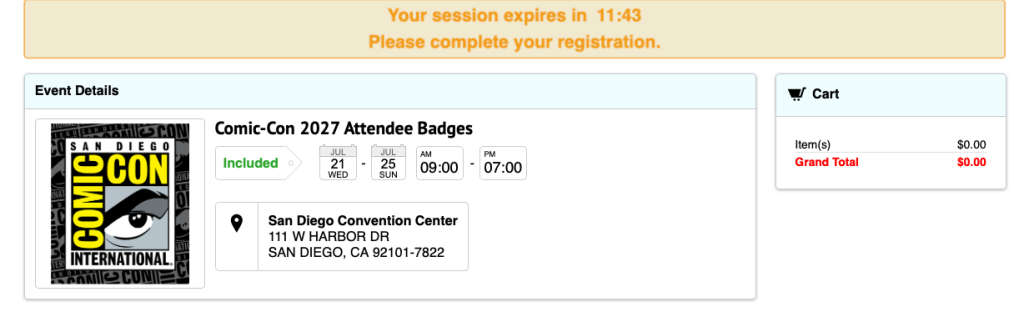
Magkakaroon ka ng 15 minuto upang bumili ng mga badge para sa hanggang sa tatlong miyembro. Tiyaking handa ang mga sumusunod:
- Ang iyong mga kredensyal sa pag login ng Member ID
- Lahat ng karapat-dapat na Member ID at apelyido ng mga taong nais mong bilhin ang mga badge ( Kung may kasamang espesyal na character o suffix ang apelyido, dapat itong isama)
- Anong mga araw na interesado ka at ang iyong grupo
- Impormasyon sa credit o debit card
Hindi maaaring ilipat ang mga badge. Hindi ka maaaring bumili ng badge para sa isang taong nasa ilalim ng iyong sariling Member ID na ilipat sa ibang account pagkatapos ng pagbebenta.
Tandaan, magkakaroon ka ng 15 minuto para makumpleto ang iyong buong sesyon ng pagpaparehistro at pagbili! Ang pagkaantala sa pag-input ng impormasyong ito ay maaaring maging sanhi ng pag-expire ng iyong session. Kung ang iyong session ay nag expire, ikaw ay ilalagay muli sa waiting room sa likod ng pila.
4. Add badges to your cart
Kung ikaw ay inilipat sa isang sesyon ng pagpaparehistro, pipiliin mo ang iyong nais na mga badge mula sa imbentaryo na magagamit at idagdag ang mga ito sa iyong cart. Siguraduhin na magdagdag ka ng mga badge para sa lahat ng mga miyembro na iyong binibili para sa bago ka magpatuloy sa pag checkout.
Palawakin ang mga hakbang sa ibaba para sa isang visual walkthrough!
4a. Idagdag mo muna ang mga badge mo
Inirerekumenda namin ang pagdaragdag ng iyong sariling mga badge sa cart muna. Ang iyong impormasyon ay pre populated sa tab na "Registrants". Lagyan ng tsek ang kahon sa tabi ng bawat araw na gusto mong dumalo at i-click ang "Idagdag sa Cart."
Kung hindi ka bumibili ng mga badge para sa iyong sarili, laktawan ang hakbang 4c.

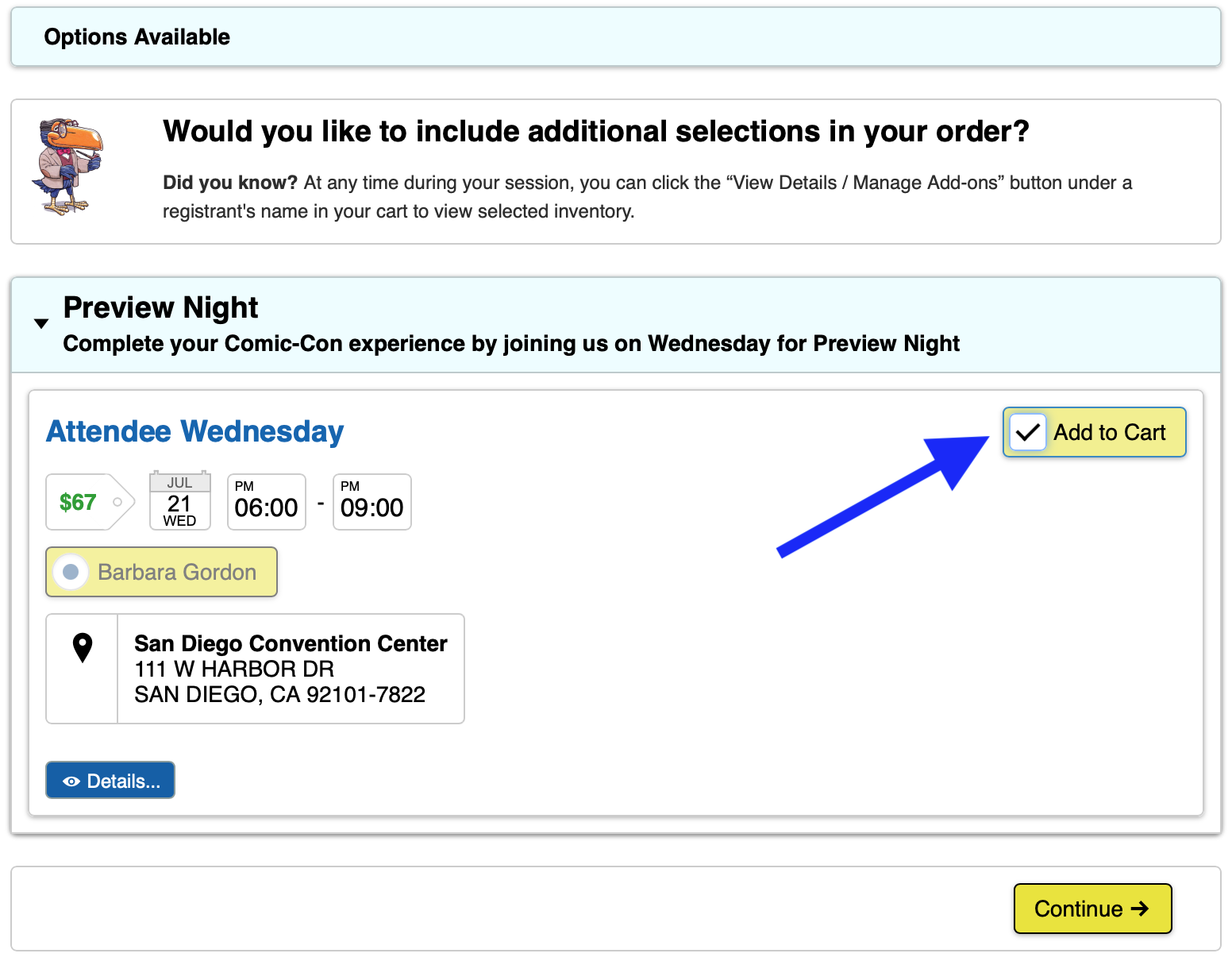
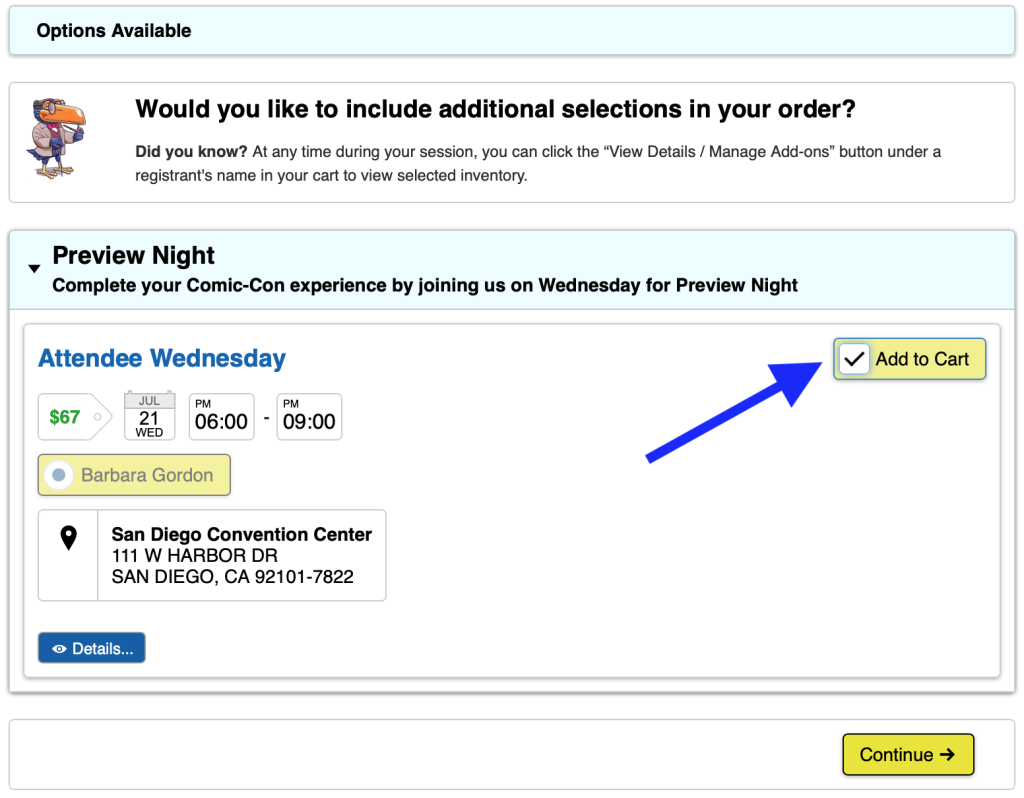
If you add all four daily badges (Thursday, Friday, Saturday, and Sunday) to your cart, you will be given the option to purchase Preview Night if inventory is available. Check the “Add to Cart” box if you’d like to attend Preview Night on Wednesday, July 21, 2027, then click “Continue.”
4b. Piliin na pumili ng mga badge para sa iba o magpatuloy sa pag checkout
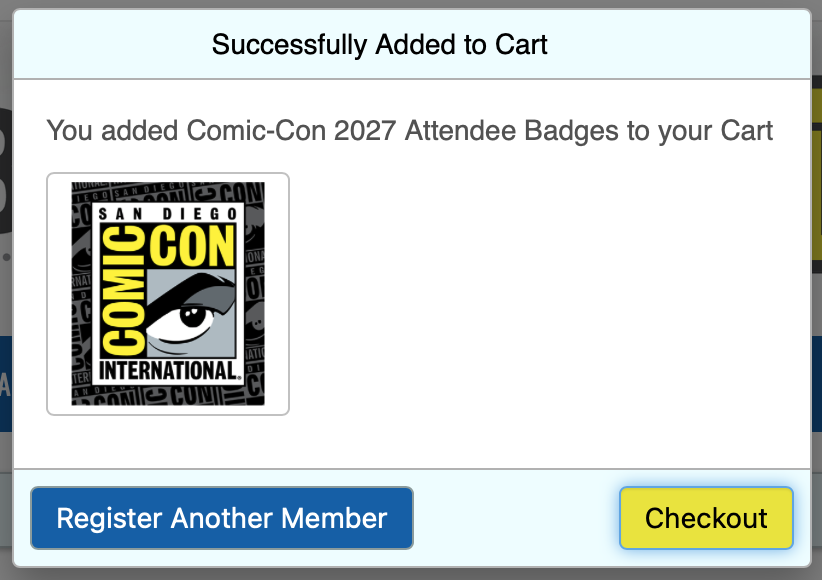
Makikita mo ang isang pop up window pagkatapos mong matagumpay na idagdag ang iyong mga badge sa cart. Mula dito, mayroon kang dalawang pagpipilian:
To purchase badges for other eligible members, click “Register Another Member.” You will need their Member ID and last name exactly as it appears on their Member ID account.
If you’re not purchasing badges for others, click “Checkout.” Once you click “Checkout” you will not be able to add or change the registrants in your cart. You will only be able to remove a registrant.
4c. Pumili ng mga badge para sa (mga) kaibigan mo
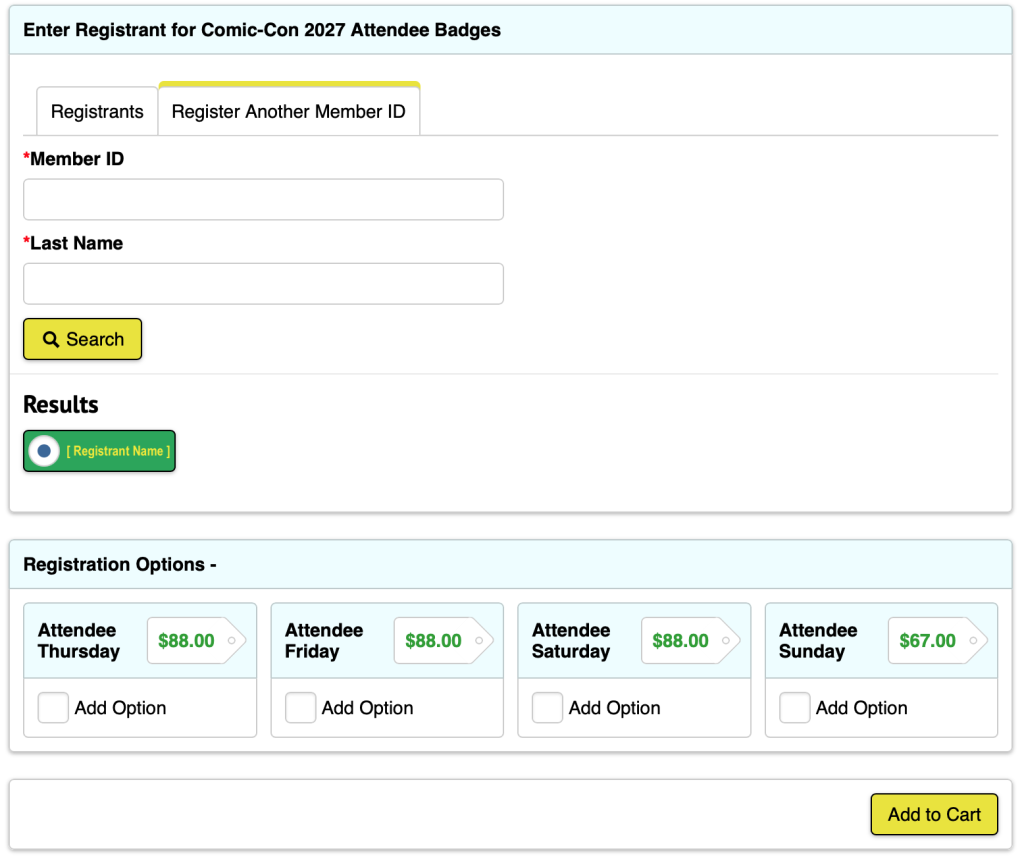
To purchase badges for others, you must locate their Member ID account. Select the “Register Another Member ID” tab, enter the Member ID and last name of the member you wish to purchase badges for, and click “Search.”
The Member ID and last name must match exactly what’s on the member’s account. If the Member ID and last name are valid, their name will appear in a green box. If they have a special character in their last name or use a suffix, you must include it.
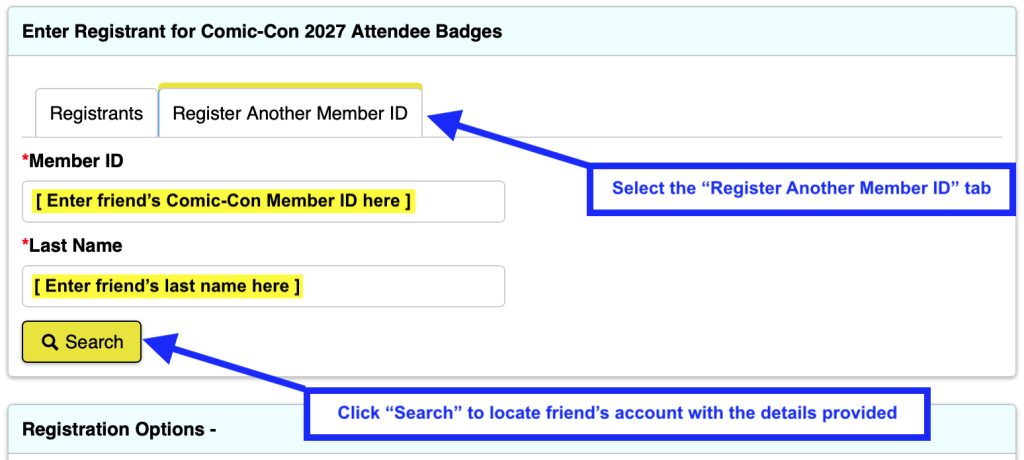
Lagyan ng tsek ang kahon sa tabi ng bawat araw na gustong dumalo ng iyong kaibigan at i-click ang "Idagdag sa Cart."
If you add all four daily badges (Thursday, Friday, Saturday, and Sunday) for your friend to your cart, you will be given the option to purchase Preview Night if inventory is available. Check the “Add to Cart” box if your friend would like to attend Preview Night on Wednesday, July 21, 2027, then click “Continue.”
Repeat steps 4b-4c as needed. If you’re purchasing a badge for yourself, you can purchase badges for two other eligible members. If you do not wish to purchase a badge for yourself, you can purchase for three other eligible members.
Pagkatapos mong idagdag ang iyong mga badge sa cart, i-click ang "Checkout."
5. Enter payment information
Enter your credit card information and billing address, then click “Save.” If you already have a credit card saved to your account, confirm that the desired payment method is selected, then click “Save & Continue.”
Ang mga pagbabayad ay hindi ipoproseso hanggang matapos ang pagbebenta. Dahil dito, makikita mo ang kabuuang halaga ng iyong pagbili na minarkahan bilang "Due Later." Ang mga pagbabayad ay ipoproseso sa loob ng 72 oras. Tingnan ang Mga Paraan ng Pagbabayad para sa karagdagang impormasyon.

6. Place order
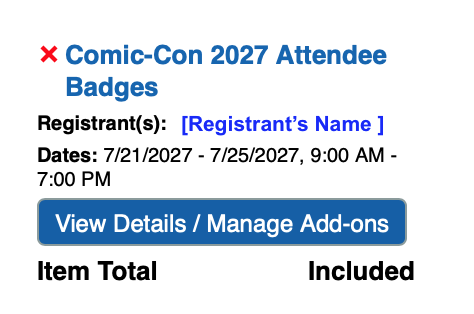
The time has come! If you have a few minutes to spare, review the badges in your cart. Each registrant will have the item “Comic-Con 2027 Attendee Badges” with their individual day selections nested beneath it. If everything looks good, click “Process Order.”
If prompted, complete the CAPTCHA that appears above the “Process Order” button. Once your order is submitted, an order acknowledgement will be sent to each registrant’s email.
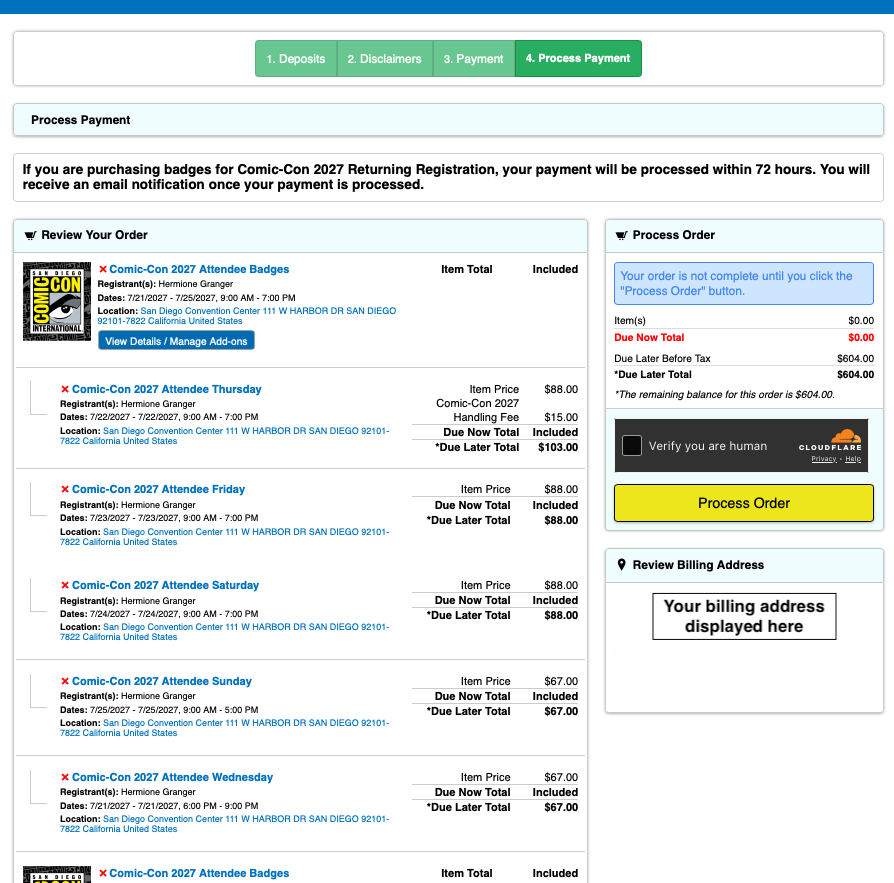
If you get an error message when you attempt to process your order, check to make sure your daily badge selections are accurate.
- You will not be able to check out with Wednesday in your cart unless you have purchased, or are purchasing, all four daily badge options (Thursday-Sunday).
- If you only have “Comic-Con 2027 Attendee Badges” in your cart as a standalone item, you will not be able to check out until you select which days you’d like to purchase.
- If you receive an error message that a badge is no longer available, it must be removed from your cart before you can process your order.
FAQ sa Waiting Room
Kung papasok ako sa waiting room pag nagbukas ito ng 7:30 AM PST, nasa harap ba ako ng pila
No, early arrival to the waiting room does not provide any advantage. You do not need to rush to the waiting room at 7:30 AM PST. Just make sure to enter the waiting room before 9:00 AM PST! Everyone who entered the waiting room between 7:30 AM and 9:00 AM PST on Saturday, November 14, will be placed into a randomized queue when the badge sale begins.
Paano kung pumasok ako sa waiting room pasado 9:00 AM PST
Kung pumasok ka sa waiting room sa unang pagkakataon pagkatapos ng 9:00 AM PST, ilalagay ka sa likod ng linya. Sa malaking bilang ng mga kalahok na pumasok sa waiting room sa oras, ang iyong mga pagkakataon na mapili para sa isang sesyon ng pagpaparehistro ay minimal. Lahat ng dumating sa pagitan ng 7:30 AM PST at 9:00 AM PST ay mauuna sa iyo.
Ano po ang gagawin ko kung na disconnect ako sa waiting room
Kung anumang oras ay hindi ka na nakakonekta sa waiting room ng Queueit, bumalik lamang sa Member ID Portal. Ibabalik kayo sa lugar na itinalaga sa inyo!
★ Ano ang hitsura ng waiting room sa pagitan ng 7:30 AM PST at 9:00 AM PST bago magsimula ang badge sale
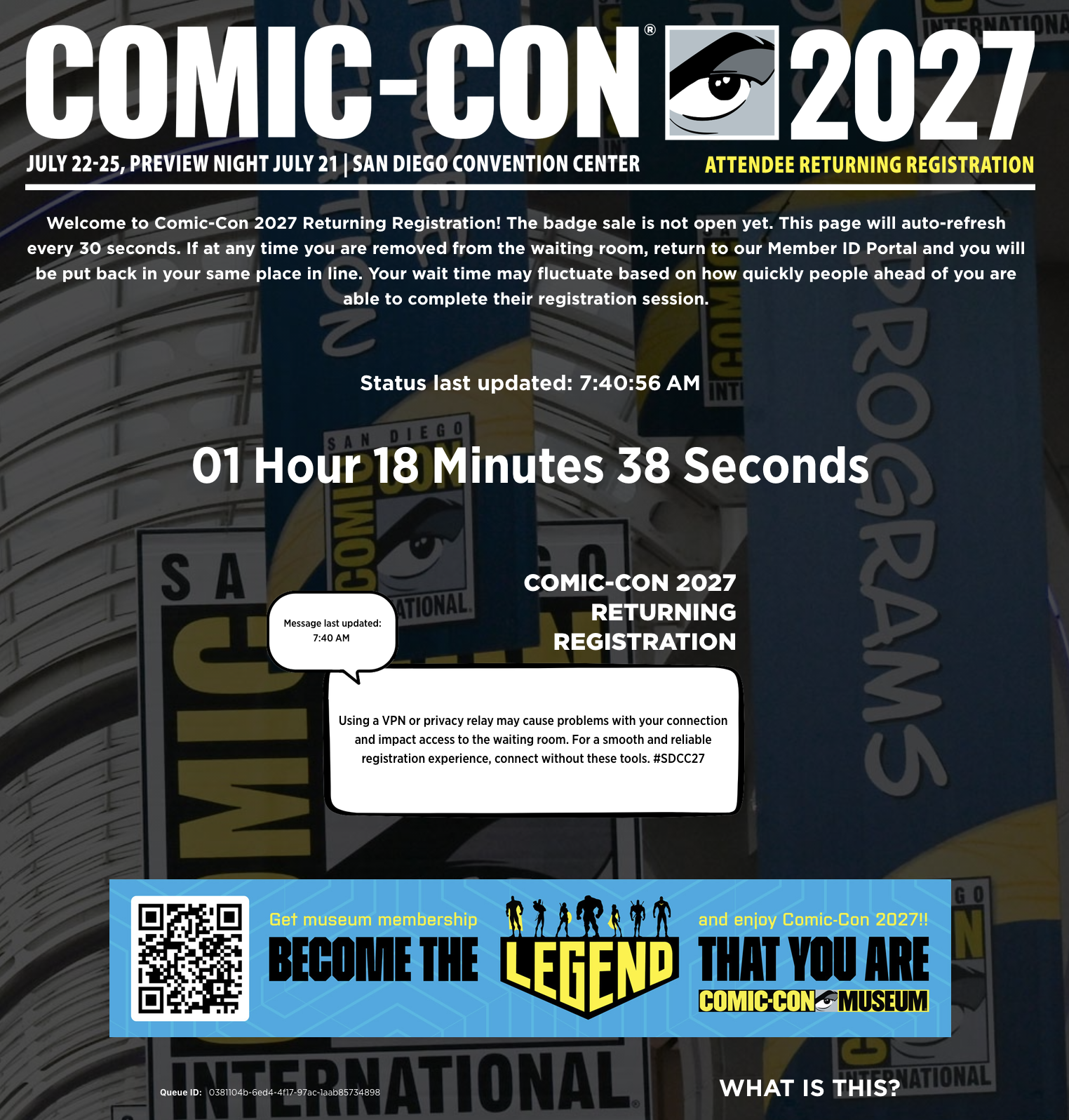
When you enter the waiting room before the badge sale begins, you will see a countdown showing the time remaining until the badge sale begins. The waiting room will have a white status message box that is updated regularly with helpful tips!
★ Ano ang hitsura ng waiting room sa sandaling ang pagbebenta ng badge ay nagsisimula sa 7:30 AM PST
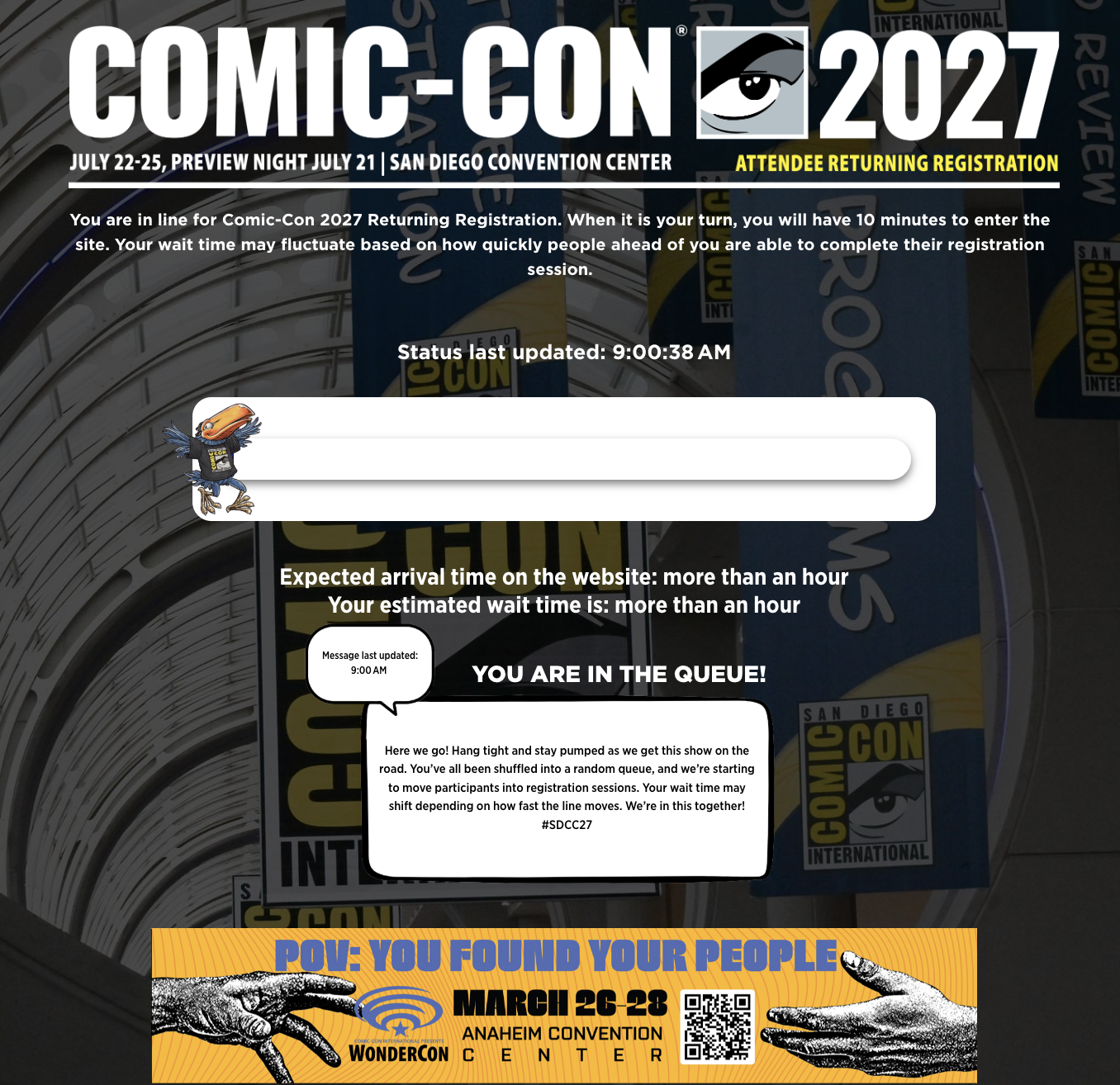
Once the badge sale begins, those in the waiting room will be placed into the queue. You will be able to see your expected wait time and see your walking Toucan begin their journey! Your wait time may fluctuate based on how quickly people ahead of you are able to complete their registration session. Keep an eye on the white status message box for updates on badge inventory.
FAQ sa Registration Session
How many people can I purchase badges for?
You can purchase for three* eligible members total, including or excluding yourself. If you’re purchasing badges for yourself, you can purchase badges for two other eligible members. If you’re not purchasing badges for yourself, you can purchase badges for three other eligible members.
*This limit applies for each sale. If you purchased for three members during Returning Registration, you are allowed to purchase for another three members during Open Registration if selected for a registration session. You may not purchase badges for more than three members in any sale.
Ano po ang mangyayari kung mag expire ang registration session ko
When a registration session expires without completing a purchase, you’re placed back into the waiting room at the back of the line.
Ano ang gagawin ko kung ako ay napili para sa isang sesyon ng pagpaparehistro at makita ang isang mensahe na "Hindi Natagpuan ang Pahina"?
Kung ikaw ay napili para sa isang sesyon ng pagpaparehistro at makita ang mensaheng "Hindi Natagpuan ang Pahina," mangyaring i click ang "Buksan ang Pagpaparehistro" o "Mag login" mula sa tuktok na menu bar. Sundin ang alinman sa ruta upang mag log in sa iyong Member ID account at bumili ng mga badge sa loob ng inilaan na oras.
Pwede po ba mag edit ng badge selections tapos naidagdag ko na sa cart ko
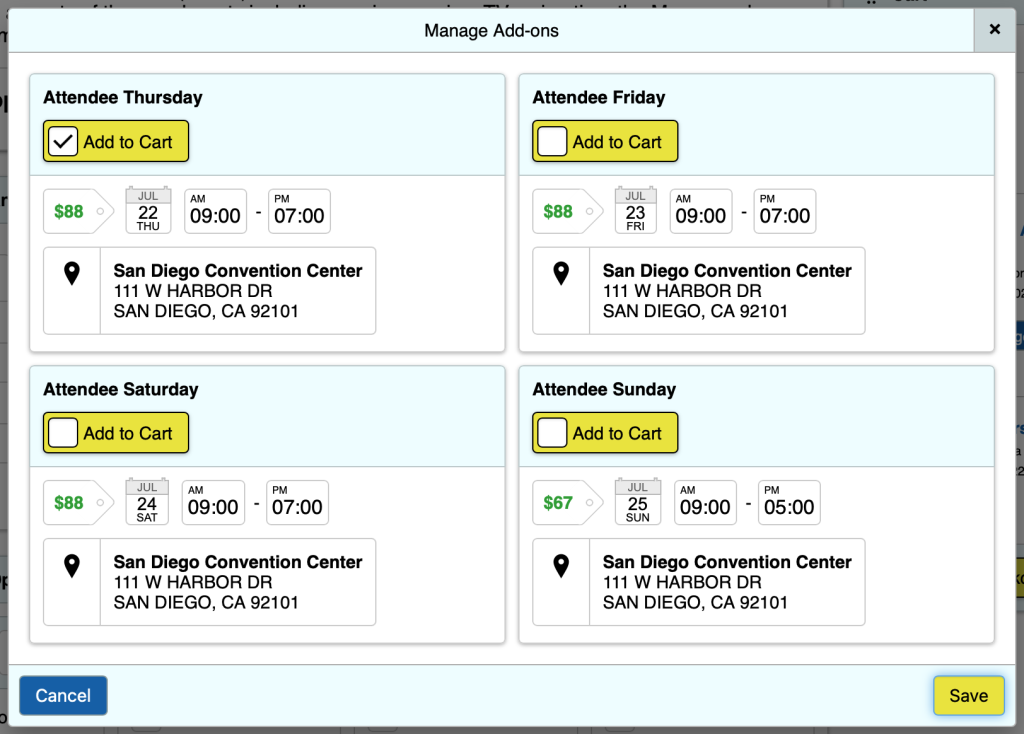
Yes! Once badges have been added to your cart, you can click the red X next to a badge to remove it. To select additional badges for a registrant, click the “View Details / Manage Add-ons” button next to the registrant’s name. Edit the available badge selections from the “Manage Add-ons” pop-up window and click “Save.”
Maaari mo lamang i edit ang mga pagpipilian ng badge, hindi ka magagawang magdagdag o baguhin ang mga registrants sa sandaling lumipat ka sa nakalipas na pahina ng pagpaparehistro.
Karagdagang impormasyon
Imbentaryo ng Badge
Ang mga badge ay maaaring mabilis na mabenta. Kung ikaw ay napili para sa isang sesyon ng pagpaparehistro, ipapakita sa iyo ang imbentaryo na magagamit sa oras na iyon. Ang mga badge ay inaalok bilang pang araw araw na mga pagpipilian lamang. May pagkakataon na ang mga badge na idinagdag mo sa iyong cart ay hindi magagamit sa oras na iproseso mo ang iyong order.
If you receive an error message that a badge is no longer available, please click the red X next to that item to remove it from your cart, then click “Process Order” to purchase the remaining available badges.
Preview Night at 4-Day Badges
Ang opsyon na Preview Night badge ay maaari lamang mabili kung bumili ka ng badge ng Huwebes, Biyernes, Sabado, at Linggo. Preview Night ay hindi isang stand alone na pagpipilian. Tulad ng mga nakaraang taon, kung bibili ka ng apat na daily badge (Huwebes hanggang Linggo) ay awtomatikong iko convert ito sa 4 Day badge. Hindi ka maaaring mag opt out sa pagpapatibay.
Mga Badge ng Bata
Ang mga bata (edad 12 pababa) ay libre sa isang nagbabayad na matanda. Mag click dito para sa karagdagang impormasyon sa aming Child Badge Policy.
Mga Kumpirmasyon ng Badge
Ang mga kumpirmasyon ng badge ay ipapadala sa ibang pagkakataon, sa sandaling ang deadline ng refund ay lumipas.
Payments
Comic-Con accepts Visa, MasterCard, Discover, and American Express only. We do not accept PayPal or other online payment systems.
Only one form of payment can be submitted with your order. Payments will not be processed until after the sale is complete. Because of this, you will see the total amount of your purchase marked as “Due Later.” Payments will be processed within 72 hours, and the account holder that placed the order (“buyer”) will be notified of the payment status once processing is complete.
Declined Payments: If the order’s payment is declined, only the buyer will receive an email notification with an opportunity to submit a different method of payment.
- The original method of payment will attempt to be charged every day for 30 days until the payment is processed successfully, or a different method of payment is provided.
- If the buyer doesn’t submit a different method of payment that can be processed successfully, the badge holder can log in to their own account to pay for their badge directly.
- If an outstanding balance remains after 30 days, all badges in the order will be subject to cancellation. A week or so after the sale, we recommend badge holders check the “My Notifications” section of their Member ID account for a remaining balance due.
Pre-Saved Cards: To make your registration process smoother, we recommend saving a credit card to your account well before the day of the sale.
- Pre-saving a card to your account saves you time if you’re randomly selected for a 15-minute registration session.
- If pre-saved, the buyer will need to select the desired payment method during checkout, and it will be used to purchase all badges included in their order.
- Keep in mind that if someone purchases a badge for you, their selected payment method will be used.
Badge Buying Groups: If you are working in a badge-buying group, make sure that you are only in a group with people you trust. Buying groups can be helpful, but we’ve seen an increasing number of people get shut out due to disorganized efforts.
- Everyone in your group must operate within their own instance of the waiting room.
- If we detect that a participant has shared their waiting room information or URL, they will be removed from the registration queue and any transactions linked to it will be canceled immediately.
- Comic-Con will not intervene in disputes involving the purchase of a badge on someone else’s behalf, including situations where the individual does not reimburse you. Any reimbursement arrangements are the responsibility of the parties involved.
Mga kinakailangan sa teknolohiya
Ang waiting room na Queue-it at badge registration process ay nasubok sa pinakabagong mga bersyon ng mga modernong browser. Hindi namin magagarantiyahan ang iyong mga resulta dapat kang gumamit ng isang browser na hindi nakalista sa ibaba:
- Firefox: Pinakabagong bersyon
- Google Chrome: Pinakabagong bersyon
- Safari: Pinakabagong bersyon
- Microsoft EDGE: Pinakabagong bersyon
Ang iyong browser ay dapat magkaroon ng JavaScript at cookies na pinagana upang gumana nang maaasahan sa waiting room na Queueit. Ang mga tampok na ito ay karaniwang pinagana sa default na pagsasaayos ng karamihan sa mga modernong web browser. Kung hindi mo pinagana ang mga tampok na ito, posible na ang application ng waiting room ay hindi gumana nang maayos.
To avoid technical issues, use only one browser on a single device per person during the badge sale. Using multiple browsers or devices can disrupt your session.
We strongly advise against using a VPN or privacy relay. These tools can interfere with your connection and impact waiting room accessibility.
We are not responsible for any resulting problems.
Ang sistema ng pagpaparehistro ng badge ay hindi naka format para sa mga iPad, tablet, o mobile device. Bagama't maaaring gamitin ang mga mobile device sa pagbili ng badge, hindi kayang garantiyahan ng Komik-Con na ang sistema ng pagpaparehistro ay kumilos ayon sa inaasahan gamit ang mobile device.
Tiyaking naka-off ang mga setting ng pag-save ng kuryente ng iyong computer o ayusin ang mga ito kung kinakailangan. Hindi mo nais ang iyong computer na kapangyarihan down o pumunta sa pagtulog habang ikaw ay nasa waiting room o sa gitna ng isang sesyon ng pagpaparehistro.
Inirerekumenda namin ang pagdaragdag ng donotreply@comic-con.org bilang isang inaprubahan / awtorisadong nagpadala sa iyong email account.
Ang pinong print
While Comic-Con has made every effort to make the badge purchase experience fair for everyone, it is possible that problems outside of our control could result in the system not working as planned. The possibility exists that anti-virus, anti-spyware, and anti-malware software may aggressively block browser cookies, JavaScript, or other operations of modern web applications. It is also possible that user error, specific hardware problems, local ISP issues, or simply the extremely high level of demand beyond our control may result in your computer and/or browser not behaving as described above. While Comic-Con has done extensive testing, we make no guarantees that your efforts will result in a successful badge purchase or that you will be selected for a registration session regardless of when you enter the process. Admittance to the waiting room does not guarantee you a registration session.
Tulad ng dati, taos puso kaming nagpapasalamat sa inyong patuloy na suporta at interes sa aming kaganapan. Alam namin na ang pagbili ng badge ay maaaring maging isang hamon at patuloy kaming nagsasaliksik ng mga pagpipilian upang mapabuti ang iyong karanasan sa online registration. Patuloy kaming mag aalok ng malalim na diskwento na mga rate para sa mga junior, matatanda, at aktibong tungkulin ng militar, pati na rin ang isa sa mga pinaka mapagbigay na libreng patakaran sa badge ng bata sa industriya ng kombensyon ng komiks.