
Comic-Con 2027 Attendee Badge Sale
开放注册
Here is everything you need to know about participating in our Open Registration badge sale for Comic-Con 2027. For badge pricing and other event-specific information, visit Badges.
在本指南中
概况
您需要的
- 访问您的动漫展会员 ID 帐户
- 准备好您的信用卡/借记卡
- 如果为他人购买,您需要朋友的会员 ID和姓氏,以及他们想要购买的天数。
时是
- Saturday, November 14!
- 排队等候室将于太平洋标准时间上午 7:30 开放。
- 销售将于太平洋标准时间上午 9:00 开始!请务必在太平洋标准时间上午 9:00 之前进入等候室。
符合资格
- 任何持有有效且已确认的 Comic-Con 会员 ID 帐户的人。
- 如果您选择为他人购买,则每个人都必须拥有自己的会员 ID 帐户。
- You can purchase for three eligible members total, including or excluding yourself.
- The Member ID Portal. This is where a virtual waiting room will be enabled.
- You must be randomly selected for a registration session in order to purchase badges.
- 请确保您能在销售前访问您的账户!如果您有机会购买徽章,系统会提示您登录账户,然后您的购买时间就开始了。
资格
Comic-Con 2027 Open Registration is open to the general public! Anyone with a valid and confirmed Member ID can participate.
- 要参加开放注册,请提前确保您可以登录您的会员 ID 帐户,如果您没有会员 ID,请立即创建!
您希望为其购买徽章的任何人也必须满足相同的资格要求。
并非所有符合条件的参会者都能在开放注册期间购买胸卡。符合条件的参会者人数多于可购买的胸卡数量。请仔细阅读以下说明,并在销售当天准备好个人信息,以增加获得胸卡的机会。
准备销售
To purchase badges during Open Registration, you must be randomly selected for a registration session. Participating in the badge sale does not guarantee selection. The information below will help you prepare if you are moved to a registration session during the sale.
1. Verify you have access to your account
Open Registration takes place on Saturday, November 14, 2026! Please make sure you can access your Member ID account before the day of the sale. You’ll need to log in if you get the opportunity to purchase badges. All registration events take place in our Member ID Portal.
2. Have attendee information ready
You can purchase badges for up to three eligible members, including or excluding yourself, during the entire sale. You will need the Member IDs, last names, and the desired days for yourself and anyone else you are purchasing badges for. For example, if only Thursday and Sunday are available by the time you are randomly selected for a purchasing window, does everyone want those days?
3. Plan your payment method
During a registration session, you will be prompted to enter one form of payment for your entire badge order. You can log in to your Member ID account and save your credit card information under “My Payment Methods” ahead of the sale. If you’re selected for a registration session, having your credit card information pre-saved for selection helps maximize your 15-minute time limit. See Payment Methods for additional information.
如何购买徽章
1. Join the virtual Waiting Room
The Queue-it waiting room will open at 7:30 AM Pacific Standard Time (PST) on the day of the badge sale. To enter the waiting room, simply visit the Member ID Portal between 7:30 AM and 9:00 AM PST on Saturday, November 14, 2026.
由于等候室有助于管理会员 ID 门户网站的流量,您可能会在登录前被安排到等候室。请确保您能在销售日之前访问您的帐户。如果您有机会购买徽章,则需要登录。
- 如果您在等候室开放前已登录会员 ID 帐户,请在等候室于太平洋标准时间上午 7:30 开放后点击顶部菜单栏中的 "开放注册"。
You do not need to rush to the waiting room at 7:30 AM PST! Eligible attendees will have over an hour to enter the waiting room. Early arrival to the waiting room does not provide any advantage over those who arrive later than you. However, you must enter the waiting room before 9:00 AM PST. If you enter the waiting room after 9:00 AM PST, you will be placed at the back of the line.
2. Wait in the queue
When the badge sale begins, everyone who entered the waiting room between 7:30 AM and 9:00 AM PST will be placed into a randomized queue. Shortly after 9:00 AM PST, groups will automatically begin moving from the waiting room to registration sessions in the order of the randomized queue. Only those selected for a registration session will have the opportunity to purchase badges.
Keep an eye on your place in line! Your wait time may fluctuate based on how quickly people ahead of you are able to complete their registration session.

请记住,在太平洋标准时间上午 7:30 至上午 9:00 之间的任何时间进入等候室都无关紧要,而且进入等候室并不保证您一定能参加注册会话。并非所有会员都会被选中参加注册会话。
Do not refresh while you are in the Queue-it waiting room! The Queue-it waiting room will automatically refresh every 30 seconds. Refreshing your browser in the waiting room may cause technical difficulties or remove you from the waiting room.
3. Join a registration session
要在开放注册期间购买胸卡,您必须被随机选中进入注册时段。如果您被调离等候室去购买胸卡,您的页面顶部会显示一个计时器,以便您了解自己在 15 分钟的注册时段内还剩下多少时间。
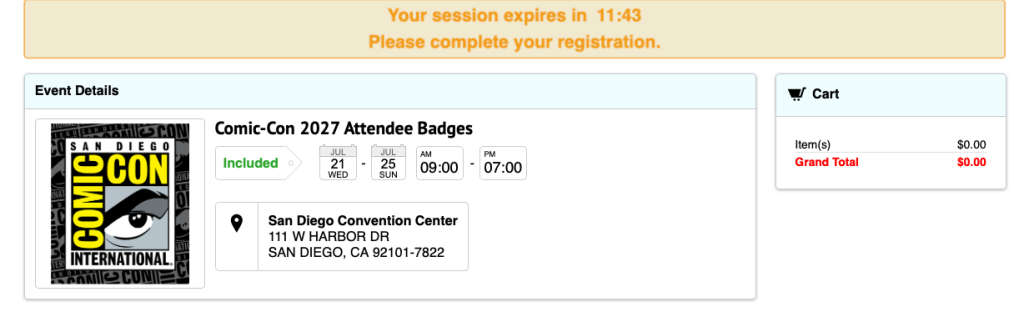
您最多有 15 分钟为三名成员购买徽章。请务必准备好以下材料:
- 您的会员 ID 登录凭证
- 所有符合条件的会员 ID 和您希望为其购买徽章的人员姓氏 (如果姓氏中包含特殊字符或后缀,则必须包括在内)。
- 您和您的团队感兴趣的日子
- 信用卡或借记卡信息
徽章不可转让。您不能用自己的会员 ID 为他人购买徽章,并在出售后转移到另一个账户。
请记住,您将有 15 分钟的时间完成整个注册会话和购买!延迟输入这些信息可能会导致您的时段过期。如果您的时段已过期,您将被安排回到队伍后面的等候室。
4. Add badges to your cart
如果您被转到注册时段,您将从现有库存中选择所需的徽章并将其添加到购物车。确保在结账前为所有会员添加徽章。
展开下面的步骤,进行直观演示!
4a.先添加徽章
我们建议您先将自己的徽章加入购物车。您的信息将预先填入 "注册人 "选项卡。勾选您想参加的每一天旁边的方框,然后点击 "添加到购物车"。
如果不是为自己购买徽章,请跳至步骤 4c。

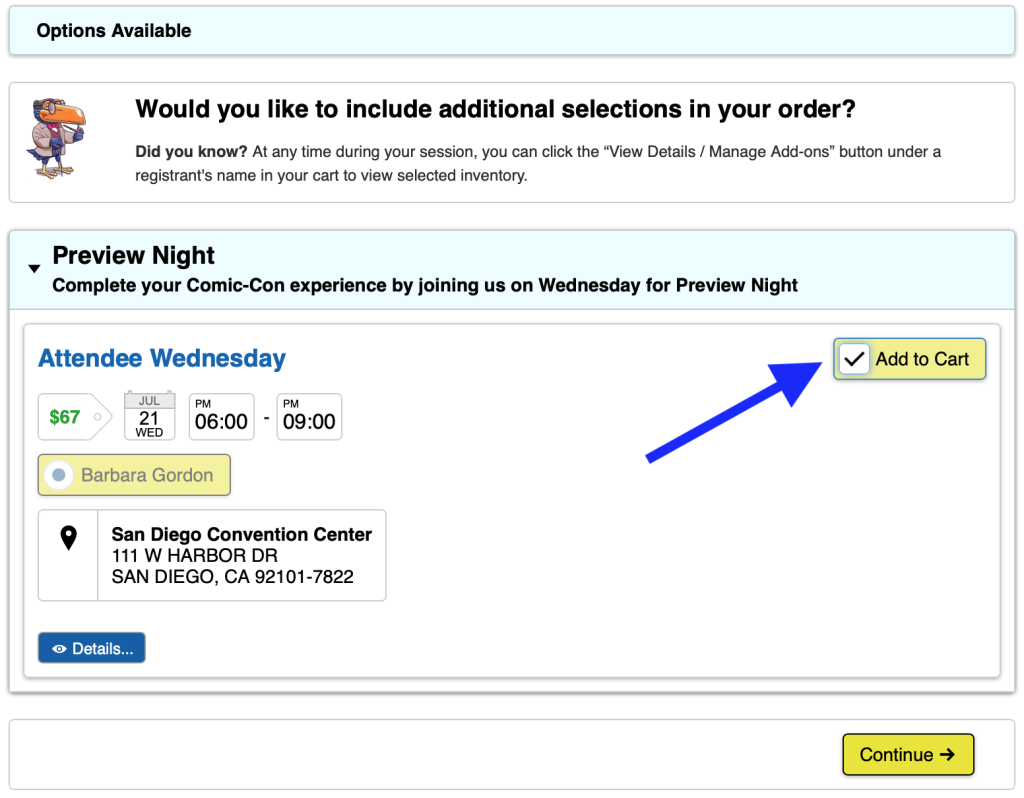
If you add all four daily badges (Thursday, Friday, Saturday, and Sunday) to your cart, you will be given the option to purchase Preview Night if inventory is available. Check the “Add to Cart” box if you’d like to attend Preview Night on Wednesday, July 21, 2027, then click “Continue.”
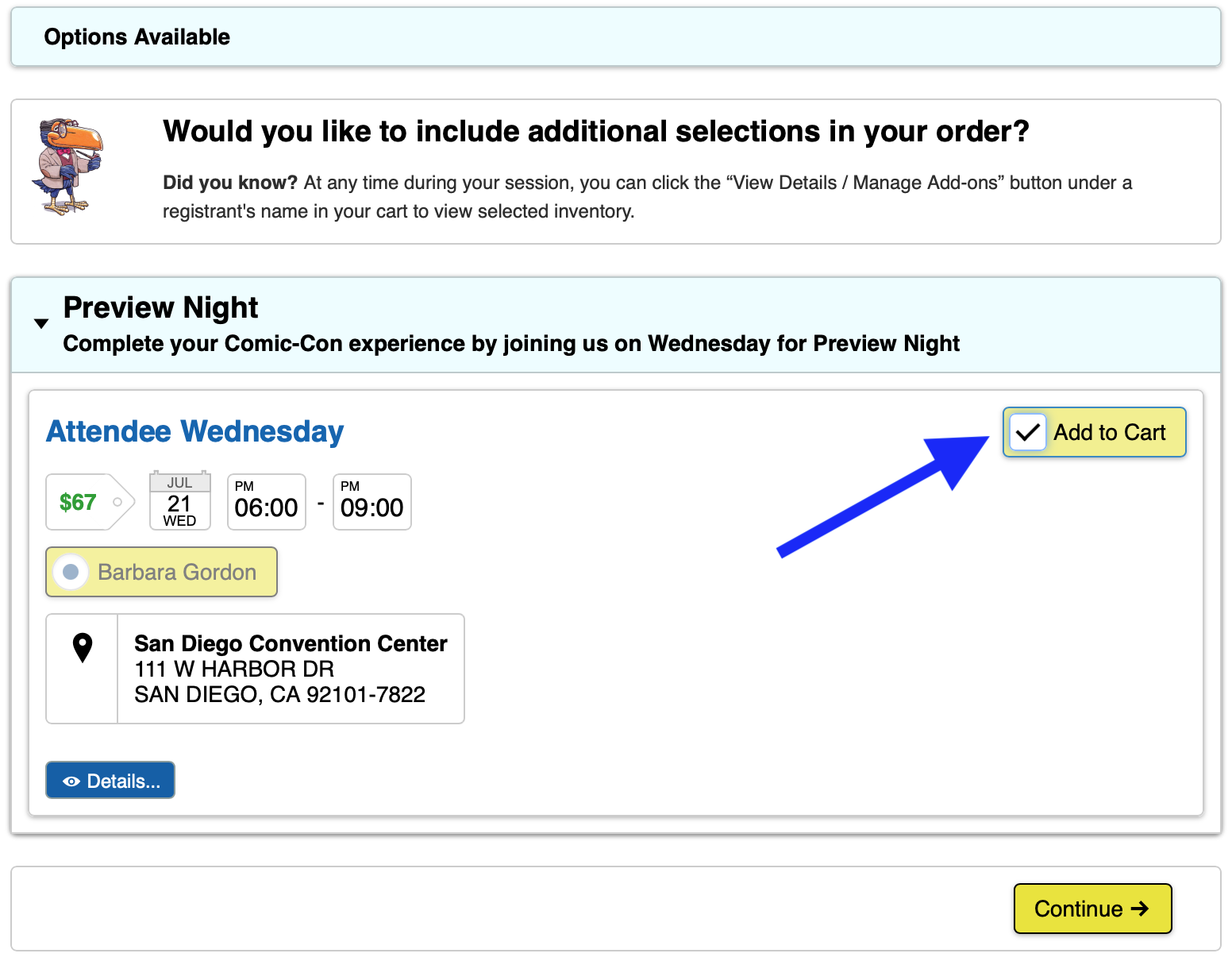
4b.选择为他人选择徽章或继续结账
成功将徽章添加到购物车后,您会看到一个弹出窗口。在这里,您有两个选项:
To purchase badges for other eligible members, click “Register Another Member.” You will need their Member ID and last name exactly as it appears on their Member ID account.
If you’re not purchasing badges for others, click “Checkout.” Once you click “Checkout” you will not be able to add or change the registrants in your cart. You will only be able to remove a registrant.
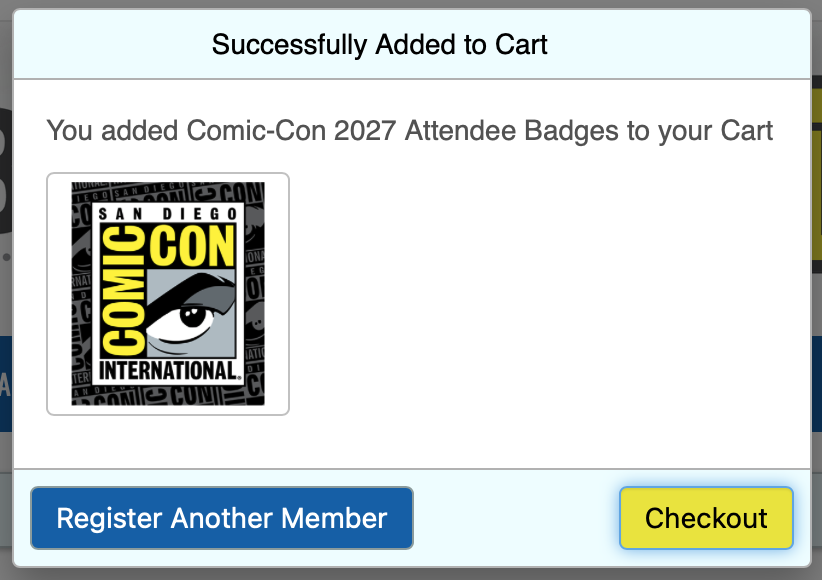
4c.为您的朋友选择徽章
To purchase badges for others, you must locate their Member ID account. Select the “Register Another Member ID” tab, enter the Member ID and last name of the member you wish to purchase badges for, and click “Search.”
The Member ID and last name must match exactly what’s on the member’s account. If the Member ID and last name are valid, their name will appear in a green box. If they have a special character in their last name or use a suffix, you must include it.
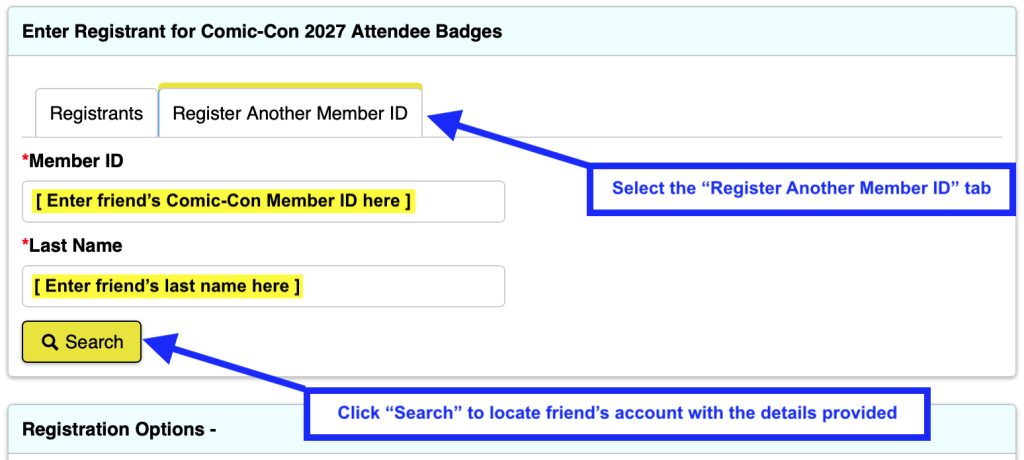
勾选您朋友希望参加的每一天旁边的方框,然后点击 "添加到购物车"。
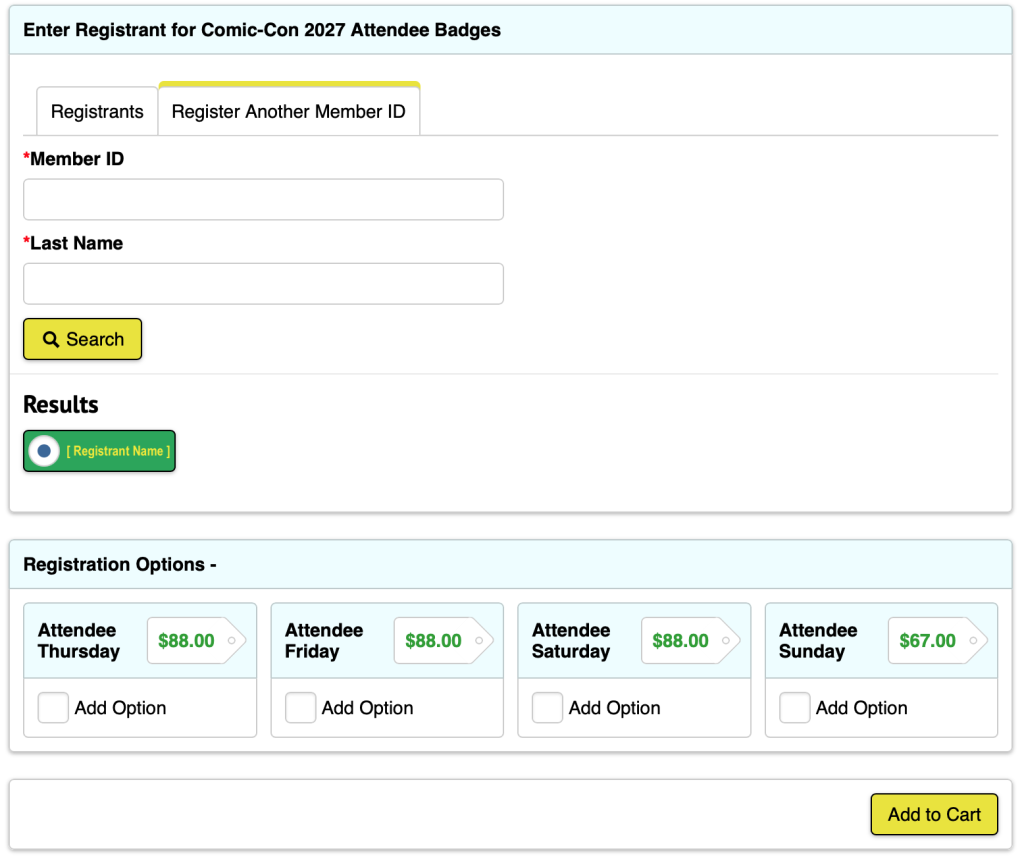
If you add all four daily badges (Thursday, Friday, Saturday, and Sunday) for your friend to your cart, you will be given the option to purchase Preview Night if inventory is available. Check the “Add to Cart” box if your friend would like to attend Preview Night on Wednesday, July 21, 2027, then click “Continue.”
Repeat steps 4b-4c as needed. If you’re purchasing a badge for yourself, you can purchase badges for two other eligible members. If you do not wish to purchase a badge for yourself, you can purchase for three other eligible members.
将徽章放入购物车后,点击 "结账"。
5. Enter payment information
Enter your credit card information and billing address, then click “Save.” If you already have a credit card saved to your account, confirm that the desired payment method is selected, then click “Save & Continue.”
销售完成后才会处理付款。因此,您将看到您的购物总金额被标记为 "稍后支付"。付款将在 72 小时内处理。有关更多信息,请参阅付款方式。

6. Place order
The time has come! If you have a few minutes to spare, review the badges in your cart. Each registrant will have the item “Comic-Con 2027 Attendee Badges” with their individual day selections nested beneath it. If everything looks good, click “Process Order.”
If prompted, complete the CAPTCHA that appears above the “Process Order” button. Once your order is submitted, an order acknowledgement will be sent to each registrant’s email.
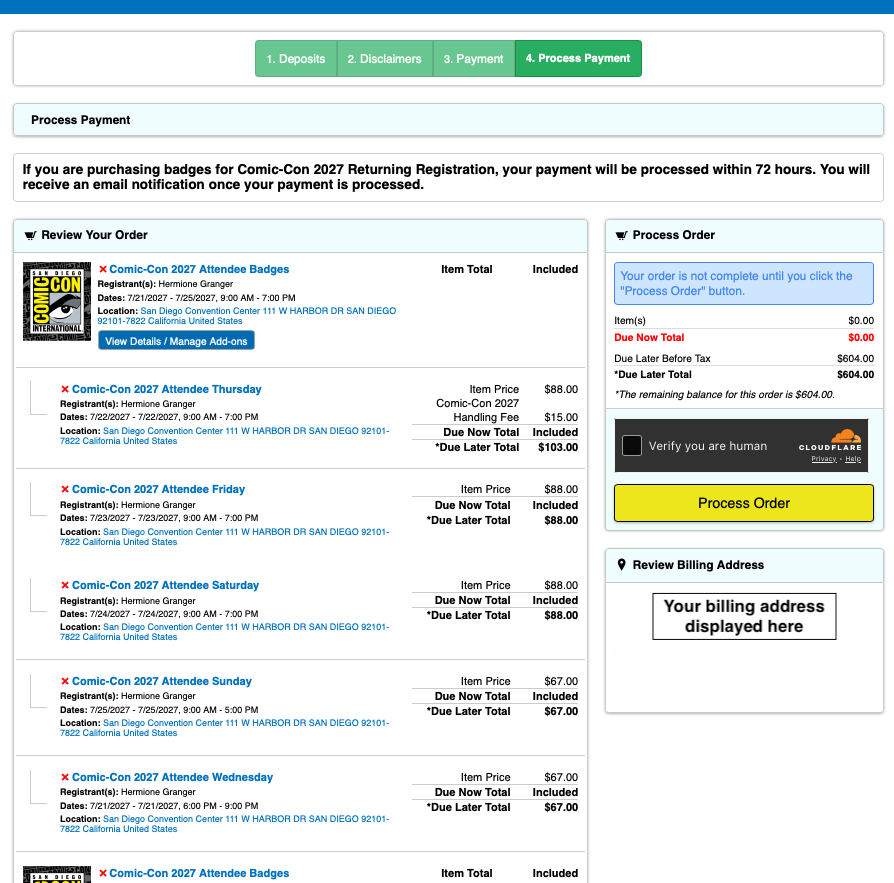
If you get an error message when you attempt to process your order, check to make sure your daily badge selections are accurate.
- You will not be able to check out with Wednesday in your cart unless you have purchased, or are purchasing, all four daily badge options (Thursday-Sunday).
- If you only have “Comic-Con 2027 Attendee Badges” in your cart as a standalone item, you will not be able to check out until you select which days you’d like to purchase.
- If you receive an error message that a badge is no longer available, it must be removed from your cart before you can process your order.
候车室常见问题
如果我在北京时间上午 7:30 候诊室开放时进入候诊室,我是否排在队伍的前面?
No, early arrival to the waiting room does not provide any advantage. You do not need to rush to the waiting room at 7:30 AM PST. Just make sure to enter the waiting room before 9:00 AM PST! Everyone who entered the waiting room between 7:30 AM and 9:00 AM PST on Saturday, November 14, will be placed into a randomized queue when the badge sale begins.
如果我在太平洋标准时间上午 9:00 之后进入候诊室怎么办?
如果您在太平洋标准时间上午 9:00 之后首次进入等候室,您将被排在队伍的后面。由于按时进入等候室的与会者人数众多,您被选中登记的机会微乎其微。所有在太平洋标准时间上午 7:30 至上午 9:00 之间到达的人都将排在您的前面。
如果与候诊室断开连接,我该怎么办?
如果您在任何时候从排队等候室断开连接,只需返回会员 ID 门户即可。您将被重新随机分配到原来的位置!
★ 在徽章销售开始之前,太平洋标准时间上午 7:30 至上午 9:00 之间的等候室是什么样子的?
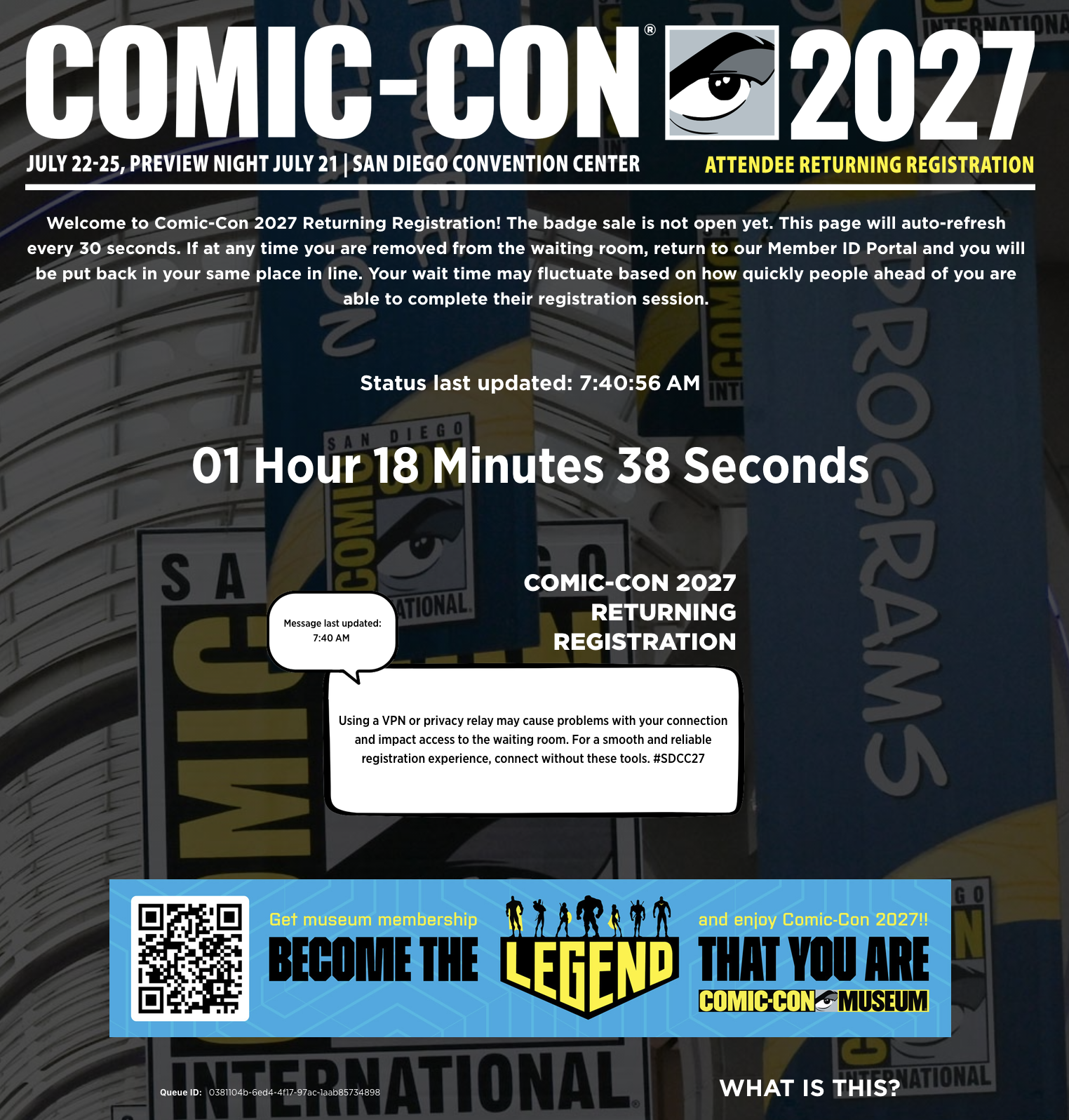
When you enter the waiting room before the badge sale begins, you will see a countdown showing the time remaining until the badge sale begins. The waiting room will have a white status message box that is updated regularly with helpful tips!
★ 太平洋标准时间上午 7:30 开始出售胸卡后,等候室会是什么样子?
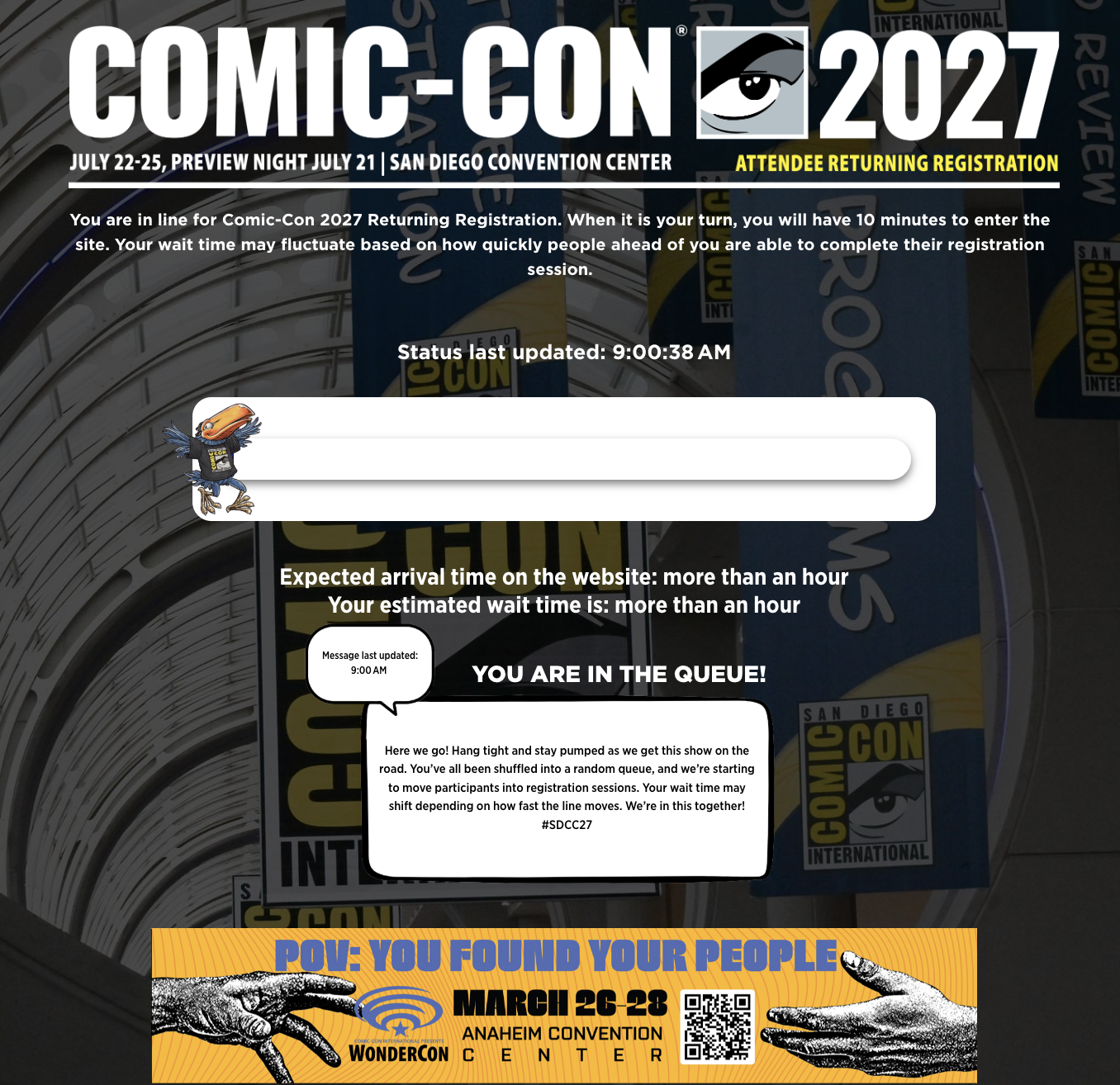
Once the badge sale begins, those in the waiting room will be placed into the queue. You will be able to see your expected wait time and see your walking Toucan begin their journey! Your wait time may fluctuate based on how quickly people ahead of you are able to complete their registration session. Keep an eye on the white status message box for updates on badge inventory.
注册环节常见问题
How many people can I purchase badges for?
You can purchase for three* eligible members total, including or excluding yourself. If you’re purchasing badges for yourself, you can purchase badges for two other eligible members. If you’re not purchasing badges for yourself, you can purchase badges for three other eligible members.
*This limit applies for each sale. If you purchased for three members during Returning Registration, you are allowed to purchase for another three members during Open Registration if selected for a registration session. You may not purchase badges for more than three members in any sale.
如果我的注册会话过期了怎么办?
When a registration session expires without completing a purchase, you’re placed back into the waiting room at the back of the line.
如果我被选中参加注册会话,但看到 "未找到页面 "信息,该怎么办?
如果您被选中参加注册会话,但看到 "Page Not Found"(找不到页面)信息,请点击顶部菜单栏中的 "Open Registration"(打开注册)或 "Login"(登录)。按照这两种方式登录您的会员 ID 帐户,并在规定时间内购买徽章。
将徽章添加到购物车后,我还能编辑徽章选择吗?
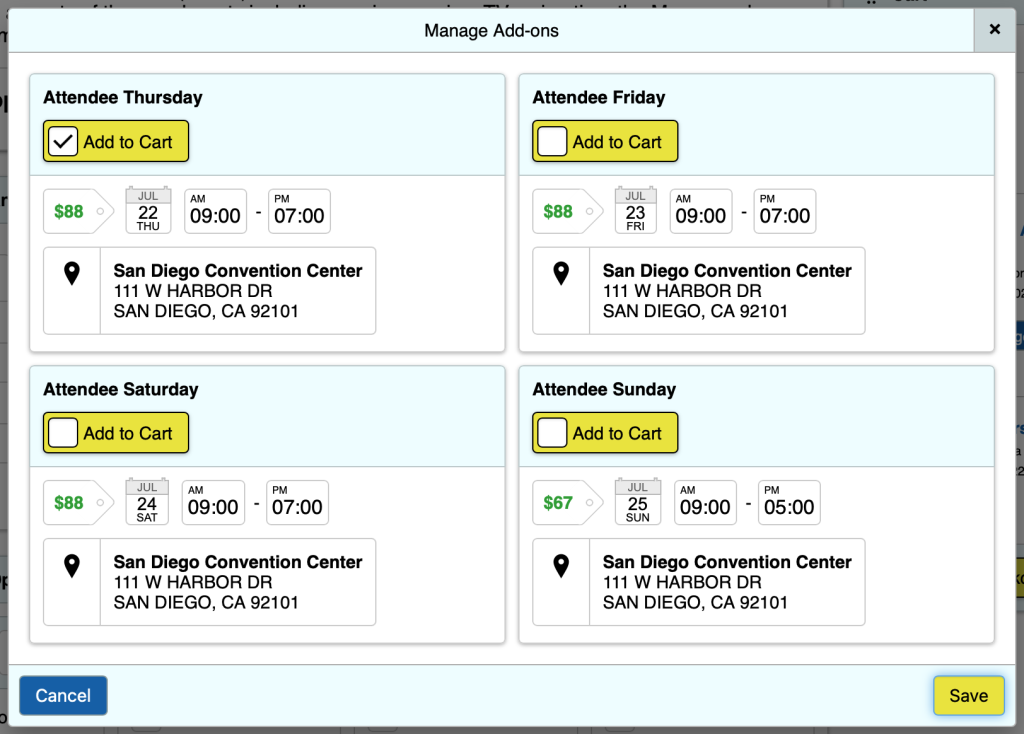
Yes! Once badges have been added to your cart, you can click the red X next to a badge to remove it. To select additional badges for a registrant, click the “View Details / Manage Add-ons” button next to the registrant’s name. Edit the available badge selections from the “Manage Add-ons” pop-up window and click “Save.”
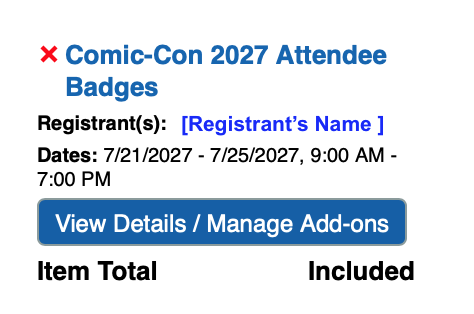
您只能编辑徽章选择,一旦进入注册页面,您将无法添加或更改注册人。
其他信息
徽章库存
胸卡很快就会售罄。如果您被选中参加某一登记时段,您将看到当时的库存情况。徽章仅作为每日选项提供。在您处理订单时,您添加到购物车中的徽章有可能已经没有了。
If you receive an error message that a badge is no longer available, please click the red X next to that item to remove it from your cart, then click “Process Order” to purchase the remaining available badges.
预览之夜和 4 天徽章
只有购买了周四、周五、周六和周日的胸卡,才能选择预览之夜胸卡。预览之夜不是一个独立的选项。与往年一样,如果您购买了所有四个每日胸卡(周四至周日),它们将自动转换为 4 日胸卡。您不能选择退出合并。
儿童徽章
儿童(12 岁及以下)与付费成人一起免费。 点击此处了解有关儿童徽章政策的更多信息。
徽章确认
一旦过了退款截止日期,稍后将发送胸卡确认函。
Payments
Comic-Con accepts Visa, MasterCard, Discover, and American Express only. We do not accept PayPal or other online payment systems.
Only one form of payment can be submitted with your order. Payments will not be processed until after the sale is complete. Because of this, you will see the total amount of your purchase marked as “Due Later.” Payments will be processed within 72 hours, and the account holder that placed the order (“buyer”) will be notified of the payment status once processing is complete.
Declined Payments: If the order’s payment is declined, only the buyer will receive an email notification with an opportunity to submit a different method of payment.
- The original method of payment will attempt to be charged every day for 30 days until the payment is processed successfully, or a different method of payment is provided.
- If the buyer doesn’t submit a different method of payment that can be processed successfully, the badge holder can log in to their own account to pay for their badge directly.
- If an outstanding balance remains after 30 days, all badges in the order will be subject to cancellation. A week or so after the sale, we recommend badge holders check the “My Notifications” section of their Member ID account for a remaining balance due.
Pre-Saved Cards: To make your registration process smoother, we recommend saving a credit card to your account well before the day of the sale.
- Pre-saving a card to your account saves you time if you’re randomly selected for a 15-minute registration session.
- If pre-saved, the buyer will need to select the desired payment method during checkout, and it will be used to purchase all badges included in their order.
- Keep in mind that if someone purchases a badge for you, their selected payment method will be used.
Badge Buying Groups: If you are working in a badge-buying group, make sure that you are only in a group with people you trust. Buying groups can be helpful, but we’ve seen an increasing number of people get shut out due to disorganized efforts.
- Everyone in your group must operate within their own instance of the waiting room.
- If we detect that a participant has shared their waiting room information or URL, they will be removed from the registration queue and any transactions linked to it will be canceled immediately.
- Comic-Con will not intervene in disputes involving the purchase of a badge on someone else’s behalf, including situations where the individual does not reimburse you. Any reimbursement arrangements are the responsibility of the parties involved.
技术要求
Queue-it 候考室和胸卡注册流程已在最新版本的现代浏览器上进行了测试。如果您使用的浏览器未在下面列出,我们无法保证您的结果:
- 火狐浏览器最新版本
- 谷歌浏览器:最新版本
- Safari最新版本
- Microsoft EDGE:最新版本
您的浏览器应启用 JavaScript 和 cookies,以便在 Queue-it 候机室中可靠运行。大多数现代网络浏览器的默认配置通常都已启用这些功能。如果未启用这些功能,候机室应用程序可能无法正常运行。
To avoid technical issues, use only one browser on a single device per person during the badge sale. Using multiple browsers or devices can disrupt your session.
We strongly advise against using a VPN or privacy relay. These tools can interfere with your connection and impact waiting room accessibility.
We are not responsible for any resulting problems.
胸卡登记系统 不ipad、平板电脑或移动设备的格式。虽然可以使用移动设备购买胸卡,但 Comic-Con 无法保证注册系统在使用移动设备时的表现与预期一致。
请确保您电脑的省电设置处于关闭状态,或在必要时进行调整。当您在候诊室或注册过程中时,您不希望电脑断电或进入睡眠状态。
我们建议将donotreply@comic-con.org添加为您电子邮件账户的认可/授权发件人。
细枝末节
While Comic-Con has made every effort to make the badge purchase experience fair for everyone, it is possible that problems outside of our control could result in the system not working as planned. The possibility exists that anti-virus, anti-spyware, and anti-malware software may aggressively block browser cookies, JavaScript, or other operations of modern web applications. It is also possible that user error, specific hardware problems, local ISP issues, or simply the extremely high level of demand beyond our control may result in your computer and/or browser not behaving as described above. While Comic-Con has done extensive testing, we make no guarantees that your efforts will result in a successful badge purchase or that you will be selected for a registration session regardless of when you enter the process. Admittance to the waiting room does not guarantee you a registration session.
一如既往,我们衷心感谢您对我们活动的持续支持和关注。我们知道购买胸卡是一项挑战,因此我们不断探索各种方案,以改善您的在线注册体验。我们将继续为大三学生、大四学生和现役军人提供超低折扣价,以及最慷慨的 最慷慨的免费儿童胸卡政策之一的免费儿童胸卡政策。